
As promised, I’ve done a bit more thinking about how to help folks who are going through long lists of search results, possibly generated by complicated searches. Most of what I ended up doing centers on a feature I’ve been calling “My Searches.” I realized as I started digging into this that I had already made some improvements to this feature based on feedback. But I never got around to blogging about that, so if you haven’t looked at this feature recently, it’s quite a bit different.
What is My Searches?
As you may have noticed, I haven’t been very consistent in the terminology I use for this feature. In previous posts and on the help page, I’ve called this feature “Saved Searches,” and in the user interface, it’s called “My Searches.” It is also easy to look at this as a search history.
If you’re signed in, music4dance saves your searches, and you can see the list of the most recent searches you’ve done in the “My Searches” menu under the profile menu in the top right of the page. I don’t remember exactly when I implemented this feature, but the last major update was in 2022, and I’m guessing the initial implementation was several years before that.
Improvements:
A couple of things I added to make this feature more manageable were to allow you to delete searches you’re not particularly interested in and to associate each search with the Spotify playlist it was created from. In this most recent round, you can also filter on searches that you’ve created Spotify playlists from.
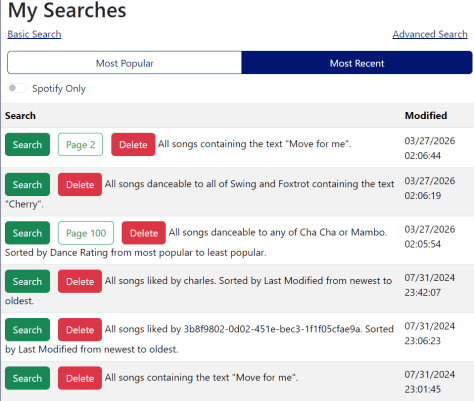
Based on feedback about returning to a specific page in a search, the system now stores the most recent page you’ve seen in each search, which will appear in your list as a separate button.
While I was thinking about this, it occurred to me that one of the biggest issues with this feature is that people don’t know it exists. So, under the Tools menu, I added a “Search History” item and a “Resume Search” item. If you’re signed in, “Search History” just takes you to the “My Searches” page, and “Resume Search” takes you to the most recent page of the last search you ran. If you’re not signed in, you see a message to register or sign in to use the feature.
I’ve also added a “Delete All” option to remove all your searches from the database.
What’s Next:
I’ll likely pause on this feature for now, but please let me know if there are any aspects that would work better for you. Some of my thoughts:
- I only show the top 250 most recent or most used searches. I could make this pageable like search results.
- I only do this for non-trivial searches, so if you’re going through all the Waltzes in the catalog, you won’t see the search in your saved searches, and the new menu item will take you to your most recent “non-trivial” search, not the full list of Waltzes.
- I could enable opting out of this feature and not store your searches.
- I could enable adding searches to your favorites and filter on favorites (which gets a little closer to “Saved Search” vs. “Search History.”)
Step of the Month:
I’ve traditionally closed out these posts with a generic ask to check out the contributions page and to please send feedback on anything in the post or your general thoughts. That’s been less effective than I like, so I’m going to pivot. Each month, I’ll choose one specific ask, which may or may not be on the contributions page lists, but would really help keep music4dance and the community strong. I’ve decided to call this section “Step of the Month” – a play on dance steps and steps to help – and see if that gets a response. If the response is to hold your nose and run away from plays on words, please let me know that, too.
The “Step of the Month” for March is to please follow music4dance on Spotify. This helps gain visibility and attract new participants to the community.
Thanks, everyone, for your continued support.
 music4dance