Tag Archives: Advanced Search

Enhanced Feature: Editing Tempos and Deleting Tags

Based on some of the comments on my last post, I’ve been thinking more about my early decisions concerning who can edit various aspects of a song in the music4dance catalog. I was worried that malicious actors would mess with the data, and spent considerable time designing and implementing a system that lets me roll back all edits for a specific user if I find they’re up to no good.

Oddly, I have had to spend significant energy dealing with bad actors who have been attempting to hack the site. But they’re all about things that have absolutely nothing to do with the music and dance data. I haven’t once had to back out dance votes by someone trying to break the system. I think I was overly influenced by stories about moderating issues on Wikipedia (which was relatively new at the time), and by my personal history with programmers fighting over whether three or four spaces is the “right” number to represent a tab in C.

And in my defense, dancers are often very opinionated about the definitions of dances and what is “appropriate” music to dance them to (e.g. Why is the tempo range you list for West Coast Swing wrong? and Why are the tempos that music4dance lists for Salsa wrong?). But most of what I see in those cases are angry emails about how I’ve gotten it wrong.

In the spirit of assuming that the members of the community are well-intentioned and knowledgeable (or at least self-assess well as to the limits of their knowledge), I’ve changed a couple of things about the Dance Details pages.

Tempo Editing

Some time ago, I started preferring human tempo edits over algorithmic ones. But I was only allowing a few vetted moderators to edit tempos. I’ve now opened tempo editing up to all registered users. So if you see a tempo that doesn’t make sense for a song, please go to the Song Details page (generally by clicking on the song title in search results or lists) and click the pencil icon next to the tempo. That will put the song into edit mode, and you should be able to edit the tempo. Don’t forget to save when you’re done!

If you are signed in and don’t see the pencil icon next to the tempo, it is probably because I, or another user, has already manually edited the tempo. You can generally tell this is the case by looking at the changes section in song details. If this happens frequently, I’ll consider building a moderation system of some kind, but in the meantime, please just contact me with your thoughts on the tempo and why, and we can work it out.

One special case the system can’t handle yet is when two very different dances can be danced to the same song at different tempos. I’m getting close to pulling the trigger on a solution for that, so if you come across any of these, please let me know – the more examples I have, the more general I’ll be able to make the solution.

Tag Deletion

Another attribute of song editing that’s only been accessible to select moderators in the past is the ability to delete tags created by other users. But, like tempo, the algorithms sometimes get the meter wrong (labeling something as 4/4 that should be 3/4, or vice versa). I’m also not thrilled about how broadly musical genres are applied, so I’d be happy if anyone would be willing to go in and trim some of those down. Again, generally, I’m going to assume that a discerning human user will do a better job than the algorithm. I’m also limiting this feature to deleting algorithmically created tags, not tags created by another user, for reasons similar to the Tempo Editing feature.

In order to remove tags, just click on the pencil icon at the end of the tag list on the Song Details page. The single list of tags will split into two lists, one labeled “Remove Tags.” This list contains the tags that you’ve added + the algorithmically generated tags. Clicking on the (x) icon in the tag will remove it. Again, don’t forget to save. And again, if you don’t see a tag in the Remove list that you expect, it’s probably because another user, not an algorithm, added the tag. You should be able to confirm this by looking at the changes section. Please contact me in such cases, and I’ll resolve them manually.

Step of the Month:

As I noted previously, I’ve traditionally closed out these posts with a generic ask to check out the contributions page and to please send feedback on anything in the post or your general thoughts. That’s been less effective than I like, so I’m pivoting. Each month, I’ll choose one specific ask that may or may not be on the contributions page lists, but would really help keep music4dance and the community strong. I’ve decided to call this section “Step of the Month” – a play on dance steps and steps to help – and see if that gets a response. If the response is to hold your nose and run away from plays on words, please let me know that, too.

The “Step of the Month” for April is to vote on songs that you like to dance to. This will make the catalog more useful for everyone.

Thanks, everyone, for your continued support.

What Happens When a Song is Danced at Different Tempos?

Sometimes, a song can be a perfectly good Bolero when heard one way but a Salsa when counting the music differently. Another example is Slow Dance (Castle Foxtrot) vs. Lindy Hop. Generally, this phenomenon is because, with some music, it’s easy to count what the musicians see as either a half note or a quarter…

Is music4dance becoming too popular?

I first published music4dance in 2013 and, within a year or so, started seeing traffic measurable in the thousands of active users per month. Usage plateaued there for over a decade, but last year, the numbers started climbing rapidly – into ranges better measured in tens of thousands. Now these are very rough measures from…

Song Details

The music4dance song details page contains all of the information that we have gathered about a song, including tags and dances that you have may have added. Below is a snapshot of a song details page for “(I’ve Had) The Time of My Life” as seen by a user “Charlie” while he is editing it.…

Updated Feature: Search History

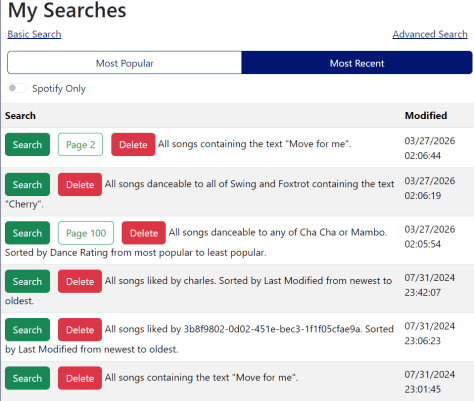
As promised, I’ve done a bit more thinking about how to help folks who are going through long lists of search results, possibly generated by complicated searches. Most of what I ended up doing centers on a feature I’ve been calling “My Searches.” I realized as I started digging into this that I had already made some improvements to this feature based on feedback. But I never got around to blogging about that, so if you haven’t looked at this feature recently, it’s quite a bit different.

What is My Searches?

As you may have noticed, I haven’t been very consistent in the terminology I use for this feature. In previous posts and on the help page, I’ve called this feature “Saved Searches,” and in the user interface, it’s called “My Searches.” It is also easy to look at this as a search history.

If you’re signed in, music4dance saves your searches, and you can see the list of the most recent searches you’ve done in the “My Searches” menu under the profile menu in the top right of the page. I don’t remember exactly when I implemented this feature, but the last major update was in 2022, and I’m guessing the initial implementation was several years before that.

Improvements:

A couple of things I added to make this feature more manageable were to allow you to delete searches you’re not particularly interested in and to associate each search with the Spotify playlist it was created from. In this most recent round, you can also filter on searches that you’ve created Spotify playlists from.

Based on feedback about returning to a specific page in a search, the system now stores the most recent page you’ve seen in each search, which will appear in your list as a separate button.

While I was thinking about this, it occurred to me that one of the biggest issues with this feature is that people don’t know it exists. So, under the Tools menu, I added a “Search History” item and a “Resume Search” item. If you’re signed in, “Search History” just takes you to the “My Searches” page, and “Resume Search” takes you to the most recent page of the last search you ran. If you’re not signed in, you see a message to register or sign in to use the feature.

I’ve also added a “Delete All” option to remove all your searches from the database.

What’s Next:

I’ll likely pause on this feature for now, but please let me know if there are any aspects that would work better for you. Some of my thoughts:

  • I only show the top 250 most recent or most used searches. I could make this pageable like search results.
  • I only do this for non-trivial searches, so if you’re going through all the Waltzes in the catalog, you won’t see the search in your saved searches, and the new menu item will take you to your most recent “non-trivial” search, not the full list of Waltzes.
  • I could enable opting out of this feature and not store your searches.
  • I could enable adding searches to your favorites and filter on favorites (which gets a little closer to “Saved Search” vs. “Search History.”)

Step of the Month:

I’ve traditionally closed out these posts with a generic ask to check out the contributions page and to please send feedback on anything in the post or your general thoughts. That’s been less effective than I like, so I’m going to pivot. Each month, I’ll choose one specific ask, which may or may not be on the contributions page lists, but would really help keep music4dance and the community strong. I’ve decided to call this section “Step of the Month” – a play on dance steps and steps to help – and see if that gets a response. If the response is to hold your nose and run away from plays on words, please let me know that, too.

The “Step of the Month” for March is to please follow music4dance on Spotify. This helps gain visibility and attract new participants to the community.

Thanks, everyone, for your continued support.

New Feature: Go to Page (or I want to get to the 50th page in 77 pages of Waltz results)

One response to a recent post about Advanced Search options was:

One thing I would like on the website in general is: I am someone who is slowly making my way through all of the dance music selections for the dance styles I’m interested in. I would like it very much if there was a way I could go directly to the page at which I stop instead of having to navigate slowly to the page I want. For example, if let’s say I stop on page 50, and when I return to the task again at another time and want to start on page 51, it takes many clicks to get there.

I responded with ways to hack the URL to reach a particular page in search results, and I still think saving the URL via a browser bookmark or your note-taking system of choice is probably the best answer to the specific question.  The URL encodes all of the details of the search, including the page that you’re currently on, so you get right back to where you left off.

However, the pagination system is a feature I implemented in 2012 and haven’t revisited1 in detail since. At the time, the default pagination control that came with the UI library I was using worked perfectly well for the at most dozen (and generally more like two) pages of search results. That’s obviously not the case anymore.

I have been noodling with moving to an infinite scrolling system. This is the way many sites have moved to when presenting search results, and it would solve some other issues I’ve been having with limitations of the core indexing system I’m using. So, besides nudging me towards a more obvious way to go to a specific page in the search results, this comment may have stopped me from investing in an alternative scheme that would have made this even harder. Thank you!

I am going to continue to think about this some more. Including options like making the “my searches” list encode the page that you were last on. I don’t want to keep the page as a core part of the saved searches, since I want to show you the searches you do most frequently, but this shouldn’t prevent me from keeping a separate field for the most recently visited page for each search.

But the absolutely straightforward answer is to replace the textual indication of what page you’re on with an editable number. I did that, so now hopefully new users can easily get to a specific page in their results without digging too deeply.

Image of search results footer with editable page number

Just type the page you want to in the edit control, press Enter/Return, and the new page will load.

As always, please let me know if you have any thoughts about the subject of this post or the site by commenting below or using other feedback mechanisms listed here. And if you enjoy the site or the blog (or both), please consider contributing in whatever way makes sense for you.

  1. Ironically, I’ve re-implemented the exact same system a couple of times, once when moving to Vue.js, and again when moving to Vue3 and BootstrapVueNext. Even more ironically, getting the pagination control to work correctly in BootstrapVueNext was my first major contribution to that project… ↩︎

What is Your Favorite music4dance Feature? (2024 Edition)

I am in the middle of another substantial rewrite of parts of music4dance.net. This is why you haven’t seen much blogging or new features recently. Sorry! In any case, I should ask this question at least once a year: What do you like about music4dance, and how do you use the site? As I rework…

What is Your Favorite music4dance Feature?

I’m in the middle of doing a substantial rewrite of music4dance to modernize it and, hopefully, clean up the code enough that I can start adding new features without breaking things.  I had originally intended to keep all of the functionality of the site as I moved forward.  But this has been a bigger undertaking…

Advanced Search

The advanced search form can be found by clicking on the “Advanced Search” item in the “Music” menu or by clicking on the “Advanced Search” link on the song list page. Text Searching If you want to search specifically in certain fields, you can click the “more” button in the keywords section and get some…

The Dancers I DJ for don’t enjoy long songs. How do I find good Salsa songs that are under three minutes?

Filtering on song length is one of the most requested/appreciated features from the DeeJay/Music coordinator crowd. It’s also one of the first features I implemented in a round of requests I received from exchanges from this segment of the music4dance community – you can read about that in this post.

Since then, it has come up quite a few times, mostly as a “hey, this is one of the things I really love about music4dance,” and once or twice as a “it would be great if you implemented this feature,” in which case I get to gently (but gleefully inside) steer the questioner to the “Advanced Search Page.”

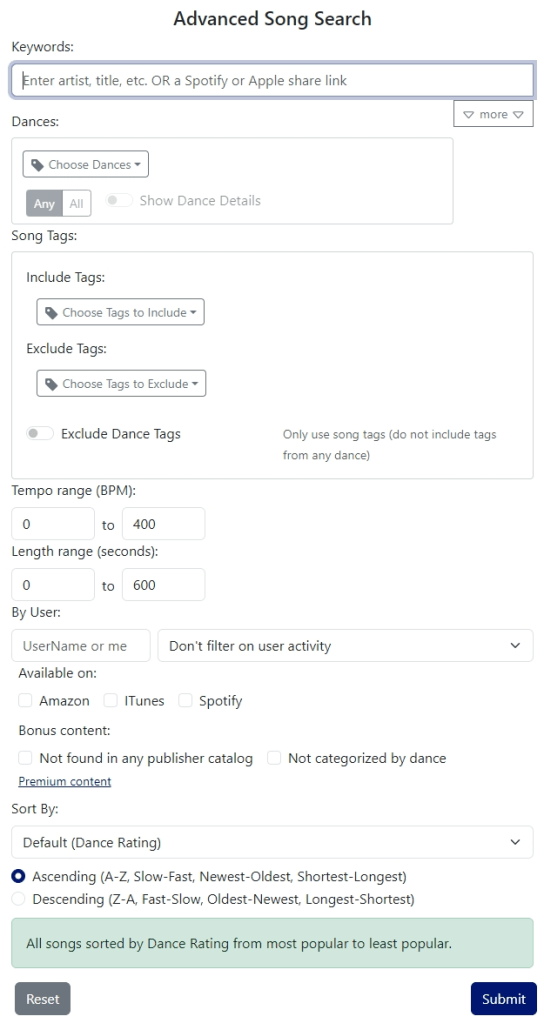
Advanced Song Search Page

I’m bringing this to your attention now because I originally implemented this feature on the cheap. I’m only letting one filter between a minimum and a maximum number of seconds (which is what I store internally). Since it is such a recognized feature, it occurred to me that it might be time to put a little polish on it. My original idea was to have a minutes/seconds control for the minimum and maximum, since that’s probably what the humans are thinking in – that way they don’t have to translate to seconds. It’s not like they can’t do the math, but if this feature is widely used, I should make the experience smoother.

Which leads me to some questions, especially if you are a DJ or music coordinator (formal or informal):

  • Would you prefer to filter on minutes/seconds rather than seconds?
  • Do you use sorting on length? (I didn’t even remember that for certain that I had enabled that until I checked) It seems that if you were to use that feature, it would be good to include the length in the results table, right?
  • Is there some other aspect of searching, filtering, or sorting on song length that could be improved?
  • Are there any other related features you would like to see when building a playlist for your dance?

And some questions for the rest of you:

  • Do you use this feature – possibly in a different way than I described, for different reasons?
  • Can you think of other things you’d like to be able to search, sort, or filter on, or in a different way?

And for everyone – since at least some part of the community has been interested in the filter on song length feature and didn’t find it without asking, any thoughts on how I could make it more obvious?

As always, please let me know if you have any thoughts about the subject of this post or the site by commenting below or using other feedback mechanisms listed here. And if you enjoy the site or the blog (or both), please consider contributing in whatever way makes sense for you.

New Feature: Filter by Song Length

If you’re trying to get a playlist together for a social dance, it would be nice for the songs to be a reasonable length for your audience.  I realize that DJ tools will let you manage this in multiple ways, but sometimes it’s just easier to start with songs in the length range you’d like. There are…

Advanced Search

The advanced search form can be found by clicking on the “Advanced Search” item in the “Music” menu or by clicking on the “Advanced Search” link on the song list page. Text Searching If you want to search specifically in certain fields, you can click the “more” button in the keywords section and get some…

Search like Google Part III: Advanced Search – The Best of Both Worlds?

Update (July 2024): This underlying search mechanism described in this series of posts is still in place and functions as described here, but the user interface has changed. Please see the Simple Search and Advanced Search documentation for how the current user interface works. I’ve just updated the music4dance site with the remaining features for…

What if I want to find just Cha Chas tagged as American Style?

Or one of the many variations, such as Slow Foxtrots labeled as “Traditional,” or Boleros labeled as “fast”?

Queries like the above have always been possible, but with a very major caveat. Up until now, you could search on Cha Cha dance and “American” style. But what that did was find all songs that had a net Cha Cha vote of at least one and a tag on any dance of “American” style. So if someone voted on a song as Rumba and tagged the Rumba as American, then someone else voted for the song as Cha Cha, searching on Cha Cha and American would include that song.

This behavior was particularly troublesome if you wanted to do something like search for fast Salsas, because you’d end up with songs that are fast Rumbas or Cha Chas, but slow Salsas, which is precisely what you don’t want. Side note: the workaround for that particular issue is to search on specific tempos, but that isn’t really the same as searching for songs that someone explicitly tagged as slow or fast for a particular dance, since there is more thought put into tagging (and not every song has a tempo associated with it).

I’ve done a bunch of restructuring and added more than a bit of UI to enable the kinds of searches that I’m describing here. I’m currently busy updating the documentation to catch up, but I hope that the fundamental change is relatively intuitive.

There have always been two kinds of tags: tags on songs and tags on top of a dance style for a song. I’m gravitating to calling the latter dance-specific tags, although I haven’t been 100% consistent yet. If you go to any of the dance details pages (try Slow Waltz), you’ll see two tag clouds now, labeled Dance Tags and Song Tags. Clicking on any of the tags in the Dance (specific) Tags section will give you the option to list the songs with that tag on Rumba.

Alternatively, you can navigate to the Advanced Search page, add Rumba to the list of dances, toggle the “Show Dance Details” switch, and select the option to include the American tag. In either case, you’ll end up with this result. Or we can answer the original question of All Cha Cha songs tagged as “American” style.

In any case, this is a very large new feature that includes a breaking schema change in the search index, so there are bound to be bugs. Please poke at it and let me know what you think. I’m doing my best to enable the deep scenarios that you ask for without overly complicating the core scenarios. Part of what I’m trying to do is what I alluded to in my last post, where I made a reference to making it easier to add refinements to dance searches, so that you can more accurately find all American Style Slow Foxtrots – once could theoretically do something similar with Country Cha Chas (which aren’t currently supported at all).

Please let me know if you have any thoughts about the subject of this post or the site by commenting below or using other feedback mechanisms listed here. And if you enjoy the site or the blog (or both), please consider contributing in whatever way makes sense for you.

New Feature: Searching on songs with a minimum number of dance votes

Several folks have been frustrated with the number of songs in the music4dance catalog that only have one or two votes for a particular dance style. This limitation doesn’t matter for many searches because you can sort by dance votes, and the most popular songs end up at the top. But if you want to…

New Dance: Single Swing

I’ve added Single Swing as a dance style that can be searched on and voted for in the music4dance catalog. While I think of this dance as a short-cut to use when I want to dance East Coast Swing to faster Jive or Lindy-Hop music, I’ve received enough feedback from the community that it’s considered a unique dance in its own right that…

“Search like Google” is now the default

Update (July 2024): This underlying search mechanism described in this series of posts is still in place and functions as described here, but the user interface has changed. Please see the Simple Search and Advanced Search documentation for how the current user interface works. I’ve just updated the music4dance site to make the new search engine the…

New Feature: Searching on songs with a minimum number of dance votes

Several folks have been frustrated with the number of songs in the music4dance catalog that only have one or two votes for a particular dance style. This limitation doesn’t matter for many searches because you can sort by dance votes, and the most popular songs end up at the top.

But if you want to sort by something else, such as tempo or date modified, you’re out of luck. That is until now.

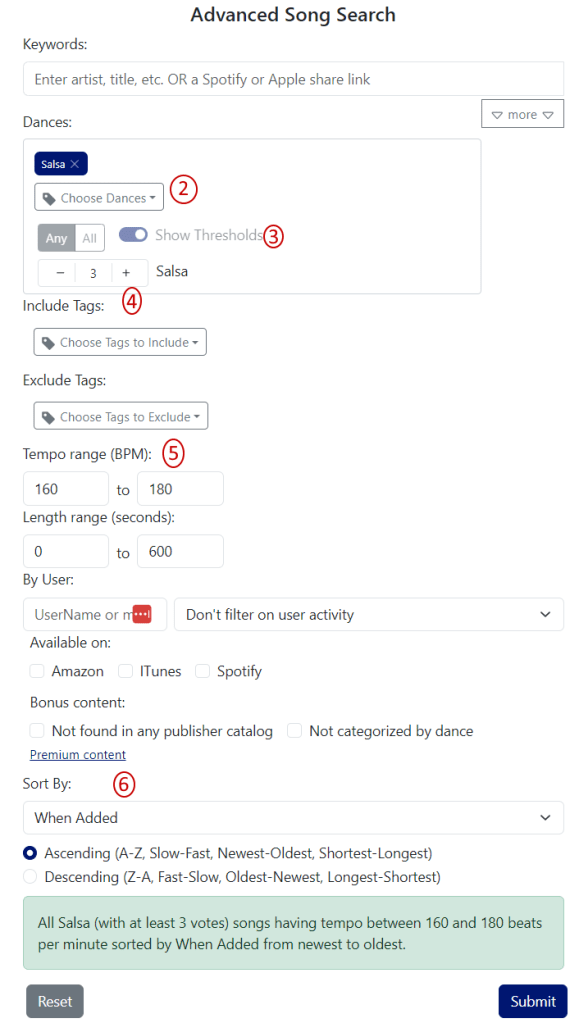
I’ve added a feature in advanced search that enhances the ability to filter by dance. Previously, you could filter only on whether a song had a net of at least one vote for a dance style. Now, you can filter on any threshold. So, if I want to create a list of all songs with at least three votes (net) between 160 and 180 beats per measure sorted by date added, I can do that now.

Here’s how:

  1. Go to Advanced Search
  2. Choose Salsa in the Dance filter
  3. Click on Show Thresholds
  4. Click on the “+” next to Salsa twice to increase the threshold to 3
  5. Change the tempo range to 160-180
  6. Choose “When Added” for the “Sort By” field
Advanced Search with Dance Thresholds
Advanced Search with Dance Thresholds example

Let me know what you think. Are there other ways you would use this kind of filter? Is there any reason to filter out the most voted for songs? That’s certainly possible, but I didn’t see a use case for that.

In addition to the specific ask above, I’m always happy to hear ideas about this post or the site by commenting below or using other feedback mechanisms listed here. And if you enjoy the site or the blog (or both), please consider contributing in whatever way makes sense for you.

How to find the most popular songs to dance to

The core mission of music4dance.net is to help you find music to dance to, whether you’re a ballroom dancer, social dancer, or really any kind of dancer. Sometimes I look at the site and say, “This could be better.” Or “Here’s a place that I’ve wanted to improve for a while but couldn’t figure out how; maybe I should try something different.” I had an “aha” moment when I was going through the site for my annual Holiday Music post. I’ve been frustrated that many of the lists of songs on music4dance.net default to some nearly random order that tended to put songs on top that only one or two people had voted for. In the Holiday Music catalog, if you choose a specific dance (like Foxtrot), the list is sorted by the number of votes for that dance. But that wasn’t true of the main list, and there wasn’t an obvious way to sort that list by dance votes.

So I took a step back to think about the general problem of getting the songs with the most dance votes to the top of lists and search results and started digging into the corner cases, which is generally where I get stuck on this kind of problem. For song sorting, I was particularly worried about an issue that a customer brought up when I first implemented the general search like google feature that enabled full-text search. In that case, I was sorting by most recent by default, and when the customer tried to do a full-text search, the song he was looking for ended up on the second page of results because there were a bunch of songs that matched his search less well but had been added more recently.

After thinking about this for a while and looking through search history, I concluded that there are two main ways people search for songs to dance to on music4dance.net. The most common search is for a specific song or artist, in which case you want the song you’re searching for to end up as close to the top of the list as possible, whether or not it is highly rated. The other way is to build lists to browse or create playlists from. In these cases, having the most popular songs at the top makes sense (unless you’ve specified something else like tempo).

Given the above, I’m more explicitly handling the case where you don’t specify a sort order as a special “default” case. If you search for specific text, I assume that’s the most important part of your search, and I sort by most relevant to the text part of the search. This part should take care of the customer I  mentioned above and folks doing that kind of search. In all other cases, I’ll sort by dance votes. You can, of course, always use the Advanced Search page to specify a sort order to override the default.

One of the reasons that I didn’t do this a long time ago is that there are some other corner cases. The biggest one is that there is no way in the underlying search engine to sort on the sum of the votes for different dances. So I can sort on votes for Rumba or even votes on Rumba, then votes for Cha Cha, but I can’t sort by the sum of the votes for Rumba and Cha Cha or even on the most total votes. I still haven’t fully solved this problem, but I have reduced it to a corner case that I believe is a better compromise than the random sort I started with.

I added a new sortable field in the database representing the sum of all dance votes on each song. With the new field, when looking at the default song list you see when you go to the Song Library, you’ll see the most popular songs on the first page. That also helps pages like the main Holiday Dance Music page, where you’ll also see the most popular songs first. The dance-specific pages were already sorted by dance votes for the Holiday, Broadway, and Halloween pages but not for the main dance lists (e.g., East Coast Swing Songs). That’s now fixed.

Unfortunately, in cases where you search for multiple dance styles, I can’t sort by the sum of the votes of those styles. Instead, I sort by each dance style vote in the order you specified them. So, if you search for all songs with Rumba, Bolero, and Cha Cha votes, you’ll get a list starting with the songs with the most votes for Rumba, then Bolero, and finally by Cha Cha votes. It’s not a perfect solution, but I think it’s still an improvement over the previous random ordering in these cases. What do you think?

Following the line of reasoning that started this post, I’m sure there are things that aren’t quite working for many of you when searching on music4dance. Please let me know. Sometimes, I just need to see the problem to come up with a fix. That’s especially true if you’re using the site in a way I didn’t expect, so even if everything is working smoothly, I’d love to hear how it’s helping you.

In addition to the specific ask above, I’m always happy to hear ideas about this post or the site by commenting below or using other feedback mechanisms listed here. And if you enjoy the site or the blog (or both), please consider contributing in whatever way makes sense for you.

I’m a ballroom dancer. Can I find practice songs that are at competition tempo? (Revisited)

This is an update to a post I wrote in 2015Music4Dance has come a long way since then, so the answer to the title question is completely different than it was nearly a decade ago.  In fact, the top-level answer is so simple I was tempted to just put a note at the top of the old post, but I had a few other things to say, so I went this route instead.

So here it is: Go to the Ballroom page and check it out.  The page is accessible from the “Music” menu.

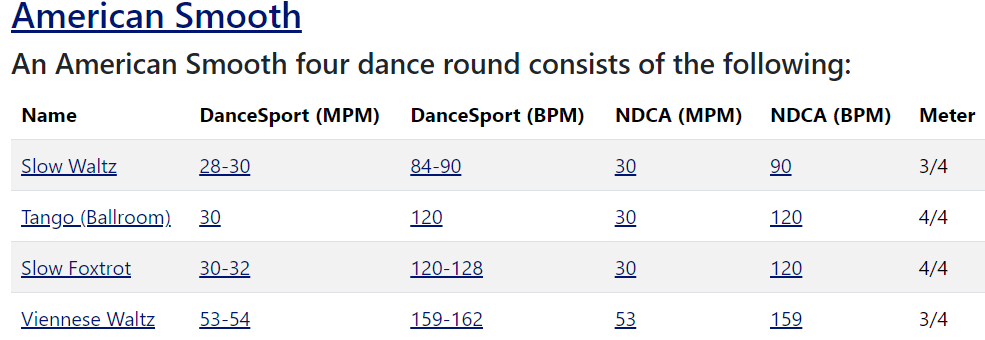
A table showing the tempi of American Smooth dances

Clicking on the round title takes you to a page with more information about that style.  For the American styles, that includes other dances that aren’t part of a round.

The Competition Ballroom page has sections for American SmoothAmerican RhythmInternational Standard, and International Latin. Each section contains basic information about the dances, including tempo in measures per minute and beats per minute1 for both of the major organizations that run Ballroom Dance Competitions.

Clicking on any tempo listings will take you to a list of songs tagged with that dance style and set to within that tempo range.  Note that I’m not currently also filtering on the American or International tag on the dance. This is for two reasons. First, the underlying database, which has a lot of excellent qualities, won’t let me do that particular search.  Second, because many of my sources don’t routinely specify the style, we’d be leaving out many great songs if we filtered that tightly.

And that’s it!


Here are some additional things that you might want to try that are adjacent to the simple answer:

If you disagree with the tempo listings and believe they’re wrong, please let me know, and if possible, cite your sources.  Tempo recommendations change occasionally, and I’m not always on top of the changes – the NDCA made some substantial changes a couple of years ago, and it took me over a year to notice.

If you want to find songs that are slower or faster than the listed tempos (e.g., if you want a slow set and a fast set), you can go through the process above and then click “change search” on the results. This will take you to the advanced search page, where you can change the tempo range without changing anything else and re-run the search.

If you have a premium subscription you can export the results of any of the above searches to Spotify.

If you would like to have this kind of support for other styles of dance, let me know where I can find reliable tempo information, and I’ll look into adding them. Some similar functionality is available on all of the dances we list, but the full tables only make sense if we have the kind of information that the ballroom dance organizations give for their competitions.

As always, I’m very interested in your feedback, so please share any thoughts and ideas about this post or the site by commenting below or using other feedback mechanisms listed here. In addition, if you enjoy the site or the blog (or both), please consider contributing in whatever way makes sense for you.


  1. Before you ask, I’m leading with “Measures Per Minute” rather than “Beats Per Minute,” as that’s how NDCA and DanceSport list tempo in their rules. If anyone in the ballroom world knows why that is, please let me know. ↩︎

New Feature: Improved Text Searching

I’ve always been a bit dissatisfied with how I set up the Artist field in music4dance.  A free text field for the artist generally works, but it doesn’t capture everything I’d like.  But since the core functionality of music4dance is to associate songs with dance styles, keeping the rest of the system simple is a sound decision, and I stand by it.

However, something comes up every few years that makes me want to at least incrementally improve the text search part of the system.  When Prince left us, I broke down and created artist pages based on the text of the artist field.  This was a significant improvement, and I returned to that when writing my DWTS Taylor Swift/Whitney Houston post.  In that post, I listed a few things that I thought could be improved with artist search and then let things rattle around in my brain for a few months.

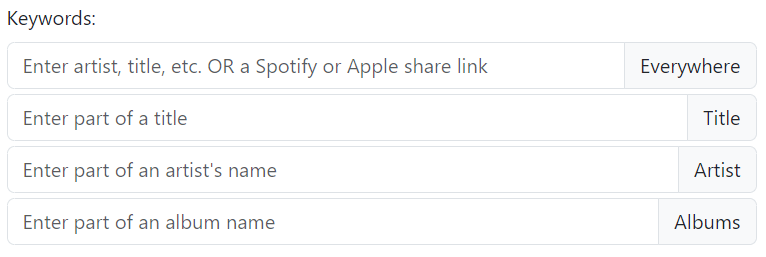
Last week, I decided to spend a little while seeing what I could do to make a worthwhile improvement in a short time.  What came out was a pair of changes.  The more visible change is an addition to the advanced search page

I’ve added some additional controls to explicitly search each of the three primary text fields in the music4dance database – Title, Artist, and Albums.  This enables a more direct way to get to all of the songs by an artist.  It also allows the inverse.  While adding the artist page let you get to all of the songs by “Prince,” it didn’t let you find all of the songs with “Prince” in the Title without also seeing the Prince and Prince Royce songs or, for that matter, songs with Prince in album names.  That is, if you can find one song with Prince as the artist you can click on the link to get to the artist page.

One side effect of this change is that if you search for Prince in the artist field, you also get Prince Royce songs, although they end up at the end of the list.  While that’s not great in the case of Prince, you now have a fast way to get to a link that will send you to the Prince artist page, which does only list Prince songs.  The good part of this quirk is that if you’re looking for songs by Benny Goodman, you’ll get a list containing not just songs with exactly “Benny Goodman” in the artist field.  You also get songs by “Benny Goodman Sextet,” “Benny Goodman Quartet,” “Benny Goodman and Charlie Christian,” “Peggy Lee and Benny Goodman,” etc.

The other more subtle improvement is that I dug into how the underlying database ranks the results of a search.  With my new understanding, I decided to weight the Title and Artist fields considerably higher than the other fields, including the Albums fields.  This helps more than one would think because I grab as many albums as I can associate with a song, and there may be a word in several of those album titles that doesn’t show up in the title or artist. Since the database uses the frequency of a word in the text as part of the weighting, those songs will show up high in the ranking, while it’s not obvious why that song showed up at all since you have to click through to the song details page to see the album names.

Give it a whirl and tell me what you think.  I will probably still do an artist index and possibly figure out a way to do some cleaning up of the database.  There are still songs where the title contains a featured artist, and that artist isn’t represented in the artist field at all, for instance.

As always, I’m very interested in your feedback, so please share any thoughts and ideas about this post or the site by commenting below or using other feedback mechanisms listed here. In addition, if you enjoy the site or the blog (or both), please consider contributing in whatever way makes sense for you.

What are your favorite Prince songs for partner dancing?

Update 2024: The content of the post is still generally accurate. There is a more recent post that outlines a new feature that adds yet another way to narrow down songs that have “Prince” in the artist’s name. New Feature: Improved Text Searching I, like many, am mourning and listening to Prince’s music. Over and…

Keep reading

Ballroom Dancing to Whitney Houston and Taylor Swift

The recent Dancing With the Stars episodes featuring Whitney Houston and Taylor Swift’s music caused a significant spike in traffic at music4dance.net, with dancers looking for music by those artists. I find this exciting for many reasons.  There’s the obvious reason that more traffic means more people showing interest in this project.  It also reinforces…
Keep reading

We’d like to dance a “real” partner dance as the first dance at our wedding (Part II: We already chose our dance)

Last time I wrote about how music4dance can help you find a dance to match the song you’d like to dance to for your first dance (or other wedding dances). This time, I’ll cover how the site can help you find a song if you already know what dance style you want to dance. Before I dig into that, I’d like to repeat that your local dance studio and your wedding DJ are both excellent sources of ideas.

Since I first wrote about this idea early a decade ago, I’ve made some improvements to the site. The easiest way to find wedding songs that match your dance is to go to the wedding music page (Music -> Wedding on the main menu). There you’ll find a table of dance styles and types of wedding dance. The cells in that table have a number that represents the number of songs we have cataloged for that dance style and also tagged with the type of wedding dance. Click on the number to get to a list of songs where you can play samples and find the full version of the song on Spotify, Apple Music, or Amazon.

The wedding music page is just a shortcut to using the advanced search tool. If you want to search for something unavailable in the wedding dance table, you can do the same type of search using the tool. For instance, I haven’t added Mother/Daughter songs to the table as of this writing. But a few people have tagged songs as Mother/Daughter. So you could go to the advanced search tool, include the tag “Mother Daughter,” optionally choose a dance, and see what comes up.

In addition, when you do an advanced search, you can find the search again on your search page. And if you’re a premium subscriber, you can export results as a Spotify playlist to listen through the songs at your convenience.

I hope this helped. And if you’ve got suggestions for other wedding-related tags, please consider becoming part of the music4dance community and adding your wedding songs to the catalog with whatever tags make sense to you – they’ll be helpful to someone else in the future.

As always, I’m very interested in your feedback, so please share any thoughts and ideas about this post or the site by commenting below or using other feedback mechanisms listed here. In addition, if you enjoy the site or the blog (or both), please consider contributing in whatever way makes sense for you.