Tag Archives: Search

Enhanced Feature: Editing Tempos and Deleting Tags

Based on some of the comments on my last post, I’ve been thinking more about my early decisions concerning who can edit various aspects of a song in the music4dance catalog. I was worried that malicious actors would mess with the data, and spent considerable time designing and implementing a system that lets me roll back all edits for a specific user if I find they’re up to no good.

Oddly, I have had to spend significant energy dealing with bad actors who have been attempting to hack the site. But they’re all about things that have absolutely nothing to do with the music and dance data. I haven’t once had to back out dance votes by someone trying to break the system. I think I was overly influenced by stories about moderating issues on Wikipedia (which was relatively new at the time), and by my personal history with programmers fighting over whether three or four spaces is the “right” number to represent a tab in C.

And in my defense, dancers are often very opinionated about the definitions of dances and what is “appropriate” music to dance them to (e.g. Why is the tempo range you list for West Coast Swing wrong? and Why are the tempos that music4dance lists for Salsa wrong?). But most of what I see in those cases are angry emails about how I’ve gotten it wrong.

In the spirit of assuming that the members of the community are well-intentioned and knowledgeable (or at least self-assess well as to the limits of their knowledge), I’ve changed a couple of things about the Dance Details pages.

Tempo Editing

Some time ago, I started preferring human tempo edits over algorithmic ones. But I was only allowing a few vetted moderators to edit tempos. I’ve now opened tempo editing up to all registered users. So if you see a tempo that doesn’t make sense for a song, please go to the Song Details page (generally by clicking on the song title in search results or lists) and click the pencil icon next to the tempo. That will put the song into edit mode, and you should be able to edit the tempo. Don’t forget to save when you’re done!

If you are signed in and don’t see the pencil icon next to the tempo, it is probably because I, or another user, has already manually edited the tempo. You can generally tell this is the case by looking at the changes section in song details. If this happens frequently, I’ll consider building a moderation system of some kind, but in the meantime, please just contact me with your thoughts on the tempo and why, and we can work it out.

One special case the system can’t handle yet is when two very different dances can be danced to the same song at different tempos. I’m getting close to pulling the trigger on a solution for that, so if you come across any of these, please let me know – the more examples I have, the more general I’ll be able to make the solution.

Tag Deletion

Another attribute of song editing that’s only been accessible to select moderators in the past is the ability to delete tags created by other users. But, like tempo, the algorithms sometimes get the meter wrong (labeling something as 4/4 that should be 3/4, or vice versa). I’m also not thrilled about how broadly musical genres are applied, so I’d be happy if anyone would be willing to go in and trim some of those down. Again, generally, I’m going to assume that a discerning human user will do a better job than the algorithm. I’m also limiting this feature to deleting algorithmically created tags, not tags created by another user, for reasons similar to the Tempo Editing feature.

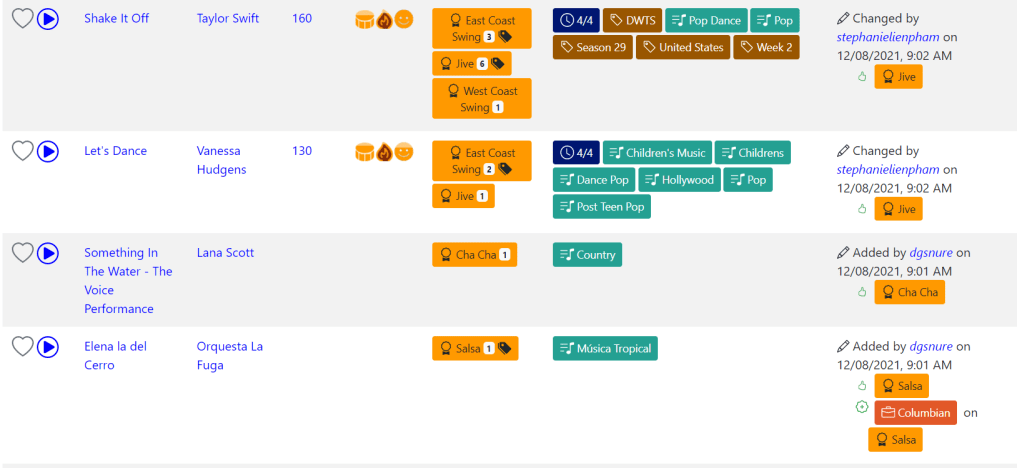
In order to remove tags, just click on the pencil icon at the end of the tag list on the Song Details page. The single list of tags will split into two lists, one labeled “Remove Tags.” This list contains the tags that you’ve added + the algorithmically generated tags. Clicking on the (x) icon in the tag will remove it. Again, don’t forget to save. And again, if you don’t see a tag in the Remove list that you expect, it’s probably because another user, not an algorithm, added the tag. You should be able to confirm this by looking at the changes section. Please contact me in such cases, and I’ll resolve them manually.

Step of the Month:

As I noted previously, I’ve traditionally closed out these posts with a generic ask to check out the contributions page and to please send feedback on anything in the post or your general thoughts. That’s been less effective than I like, so I’m pivoting. Each month, I’ll choose one specific ask that may or may not be on the contributions page lists, but would really help keep music4dance and the community strong. I’ve decided to call this section “Step of the Month” – a play on dance steps and steps to help – and see if that gets a response. If the response is to hold your nose and run away from plays on words, please let me know that, too.

The “Step of the Month” for April is to vote on songs that you like to dance to. This will make the catalog more useful for everyone.

Thanks, everyone, for your continued support.

What Happens When a Song is Danced at Different Tempos?

Sometimes, a song can be a perfectly good Bolero when heard one way but a Salsa when counting the music differently. Another example is Slow Dance (Castle Foxtrot) vs. Lindy Hop. Generally, this phenomenon is because, with some music, it’s easy to count what the musicians see as either a half note or a quarter…

Is music4dance becoming too popular?

I first published music4dance in 2013 and, within a year or so, started seeing traffic measurable in the thousands of active users per month. Usage plateaued there for over a decade, but last year, the numbers started climbing rapidly – into ranges better measured in tens of thousands. Now these are very rough measures from…

Song Details

The music4dance song details page contains all of the information that we have gathered about a song, including tags and dances that you have may have added. Below is a snapshot of a song details page for “(I’ve Had) The Time of My Life” as seen by a user “Charlie” while he is editing it.…

Updated Feature: Search History

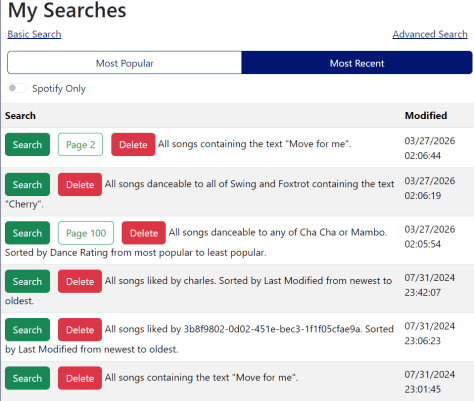
As promised, I’ve done a bit more thinking about how to help folks who are going through long lists of search results, possibly generated by complicated searches. Most of what I ended up doing centers on a feature I’ve been calling “My Searches.” I realized as I started digging into this that I had already made some improvements to this feature based on feedback. But I never got around to blogging about that, so if you haven’t looked at this feature recently, it’s quite a bit different.

What is My Searches?

As you may have noticed, I haven’t been very consistent in the terminology I use for this feature. In previous posts and on the help page, I’ve called this feature “Saved Searches,” and in the user interface, it’s called “My Searches.” It is also easy to look at this as a search history.

If you’re signed in, music4dance saves your searches, and you can see the list of the most recent searches you’ve done in the “My Searches” menu under the profile menu in the top right of the page. I don’t remember exactly when I implemented this feature, but the last major update was in 2022, and I’m guessing the initial implementation was several years before that.

Improvements:

A couple of things I added to make this feature more manageable were to allow you to delete searches you’re not particularly interested in and to associate each search with the Spotify playlist it was created from. In this most recent round, you can also filter on searches that you’ve created Spotify playlists from.

Based on feedback about returning to a specific page in a search, the system now stores the most recent page you’ve seen in each search, which will appear in your list as a separate button.

While I was thinking about this, it occurred to me that one of the biggest issues with this feature is that people don’t know it exists. So, under the Tools menu, I added a “Search History” item and a “Resume Search” item. If you’re signed in, “Search History” just takes you to the “My Searches” page, and “Resume Search” takes you to the most recent page of the last search you ran. If you’re not signed in, you see a message to register or sign in to use the feature.

I’ve also added a “Delete All” option to remove all your searches from the database.

What’s Next:

I’ll likely pause on this feature for now, but please let me know if there are any aspects that would work better for you. Some of my thoughts:

  • I only show the top 250 most recent or most used searches. I could make this pageable like search results.
  • I only do this for non-trivial searches, so if you’re going through all the Waltzes in the catalog, you won’t see the search in your saved searches, and the new menu item will take you to your most recent “non-trivial” search, not the full list of Waltzes.
  • I could enable opting out of this feature and not store your searches.
  • I could enable adding searches to your favorites and filter on favorites (which gets a little closer to “Saved Search” vs. “Search History.”)

Step of the Month:

I’ve traditionally closed out these posts with a generic ask to check out the contributions page and to please send feedback on anything in the post or your general thoughts. That’s been less effective than I like, so I’m going to pivot. Each month, I’ll choose one specific ask, which may or may not be on the contributions page lists, but would really help keep music4dance and the community strong. I’ve decided to call this section “Step of the Month” – a play on dance steps and steps to help – and see if that gets a response. If the response is to hold your nose and run away from plays on words, please let me know that, too.

The “Step of the Month” for March is to please follow music4dance on Spotify. This helps gain visibility and attract new participants to the community.

Thanks, everyone, for your continued support.

How to find the most popular songs to dance to

The core mission of music4dance.net is to help you find music to dance to, whether you’re a ballroom dancer, social dancer, or really any kind of dancer. Sometimes I look at the site and say, “This could be better.” Or “Here’s a place that I’ve wanted to improve for a while but couldn’t figure out how; maybe I should try something different.” I had an “aha” moment when I was going through the site for my annual Holiday Music post. I’ve been frustrated that many of the lists of songs on music4dance.net default to some nearly random order that tended to put songs on top that only one or two people had voted for. In the Holiday Music catalog, if you choose a specific dance (like Foxtrot), the list is sorted by the number of votes for that dance. But that wasn’t true of the main list, and there wasn’t an obvious way to sort that list by dance votes.

So I took a step back to think about the general problem of getting the songs with the most dance votes to the top of lists and search results and started digging into the corner cases, which is generally where I get stuck on this kind of problem. For song sorting, I was particularly worried about an issue that a customer brought up when I first implemented the general search like google feature that enabled full-text search. In that case, I was sorting by most recent by default, and when the customer tried to do a full-text search, the song he was looking for ended up on the second page of results because there were a bunch of songs that matched his search less well but had been added more recently.

After thinking about this for a while and looking through search history, I concluded that there are two main ways people search for songs to dance to on music4dance.net. The most common search is for a specific song or artist, in which case you want the song you’re searching for to end up as close to the top of the list as possible, whether or not it is highly rated. The other way is to build lists to browse or create playlists from. In these cases, having the most popular songs at the top makes sense (unless you’ve specified something else like tempo).

Given the above, I’m more explicitly handling the case where you don’t specify a sort order as a special “default” case. If you search for specific text, I assume that’s the most important part of your search, and I sort by most relevant to the text part of the search. This part should take care of the customer I  mentioned above and folks doing that kind of search. In all other cases, I’ll sort by dance votes. You can, of course, always use the Advanced Search page to specify a sort order to override the default.

One of the reasons that I didn’t do this a long time ago is that there are some other corner cases. The biggest one is that there is no way in the underlying search engine to sort on the sum of the votes for different dances. So I can sort on votes for Rumba or even votes on Rumba, then votes for Cha Cha, but I can’t sort by the sum of the votes for Rumba and Cha Cha or even on the most total votes. I still haven’t fully solved this problem, but I have reduced it to a corner case that I believe is a better compromise than the random sort I started with.

I added a new sortable field in the database representing the sum of all dance votes on each song. With the new field, when looking at the default song list you see when you go to the Song Library, you’ll see the most popular songs on the first page. That also helps pages like the main Holiday Dance Music page, where you’ll also see the most popular songs first. The dance-specific pages were already sorted by dance votes for the Holiday, Broadway, and Halloween pages but not for the main dance lists (e.g., East Coast Swing Songs). That’s now fixed.

Unfortunately, in cases where you search for multiple dance styles, I can’t sort by the sum of the votes of those styles. Instead, I sort by each dance style vote in the order you specified them. So, if you search for all songs with Rumba, Bolero, and Cha Cha votes, you’ll get a list starting with the songs with the most votes for Rumba, then Bolero, and finally by Cha Cha votes. It’s not a perfect solution, but I think it’s still an improvement over the previous random ordering in these cases. What do you think?

Following the line of reasoning that started this post, I’m sure there are things that aren’t quite working for many of you when searching on music4dance. Please let me know. Sometimes, I just need to see the problem to come up with a fix. That’s especially true if you’re using the site in a way I didn’t expect, so even if everything is working smoothly, I’d love to hear how it’s helping you.

In addition to the specific ask above, I’m always happy to hear ideas about this post or the site by commenting below or using other feedback mechanisms listed here. And if you enjoy the site or the blog (or both), please consider contributing in whatever way makes sense for you.

New Dance: Single Swing

I’ve added Single Swing as a dance style that can be searched on and voted for in the music4dance catalog. While I think of this dance as a short-cut to use when I want to dance East Coast Swing to faster Jive or Lindy-Hop music, I’ve received enough feedback from the community that it’s considered a unique dance in its own right that I am happy to add it. From some light searching on this dance, it has gone by several names in different regions and times. Some of the names I saw were “Sing-time Swing,” “Single rhythm swing,” and “East Coast Single Swing.” It’s also one of several dances that have been called the Jitterbug at some point in the twentieth century.

I set the initial tempo to 140-184 beats per minute (35-46 measures per minute), which I found listed in several places. Since, as far as I can tell, this isn’t a competition dance, I haven’t found an “official” tempo range and am happy to adjust if someone with more expertise in this particular dance would provide feedback. I also seeded this list of songs with publicly available lists that sounded reasonable. Please feel free to go through to vote up other swing songs that you think are good fits for this dance. You can do this by adding songs or by searching for Swing songs in the Single Swing tempo range and voting up the ones that sound like good Single Swings. I’m also happy to bulk upload lists if you’ve got a CSV file or Spotify playlist of single swings that you’d like me to include.

Over the past several years, I’ve been moving the site in a direction where I hope to be able to handle more different dance styles and add them more easily. I’m getting closer to being able to add dances quickly. However, to add a lot of different dances, I’ll have to replace the underlying search engine (or wait for it to add some new features – it will be interesting to see which comes first). Some of the things I’ve done are to make lists of dances somewhat flatter and allowing search by name in most places where dances are listed. I’ve loosened the tie between types of dances (e.g., Sing, Waltz, Latin) and dance style, so that dance styles don’t have to be as strictly categorized as before. I’ve also added synonyms to dance styles, so in most places where you see the name of a dance style, other names of the dance are shown in parenthesis.

In any case, I’m always interested in what you think would be most helpful. I’m sure there are plenty of dance styles I’m not cataloging that fit into the broad category of partner dances that are danced to a specific tempo range or style of music. If you have a dance style suggestion or other comments, please feel free to reply to this post or contact me here. In addition, if you enjoy the site or the blog (or both), please consider helping by adding to the Single Swing catalog or contributing in whatever other way makes sense for you.

New Feature: Saving and Sharing Searches

Searching for music to dance to is what music4dance is all about. 

I’ve been adding features such as Filter by Song Length, General Search, and Searching for a song from Spotify or iTunes to improve your ability to do just that. 

Another thing that I hope music4dance will be used for is to share those songs with other dancers.

There are two features that I haven’t blogged about recently that have suffered from some bit rot over the years. Since I’ve got them up and running again I want to increase awareness about them and get your feedback as to how useful these features are to you.

The first is Saving Searches. Whenever you do a search that is nontrivial, we save the search in a list that you can access through your account menu. See the help for more details.

The other is the magic of URLs. You can copy the link from the address bar and share it with other dancers. This is true of everything from the simplest searches you do from the top menu bar to the most complex searches you create using the advanced search tool. Or you can embed the link in a blog post, which is what I do regularly here. It’s one of those wonderful web features that should always just work, but often is not correctly implemented. It’s a bit of a pet peeve of mine when this doesn’t work for websites, so I try to make it work for music4dance.

And there is a third feature, which I’ve implemented more recently. With a premium subscription, you can create a Spotify playlist from a search and share the results.

I’m very interested in feedback, about this set of features. I can think of several ways I might want to improve the saving and sharing of searches, but I hesitate to invest much more into this until I hear from you. For instance, would you like to be able to show your favorite searches on your profile page? Or would you like to refine searches even more? Or would you be interested in seeing what others are searching for?

Besides the specific feedback request above, I’m always interested in your more general feedback, so please share any thoughts and ideas you have about this post or the site by commenting below or using other feedback mechanisms listed here. In addition, if you enjoy the site or the blog (or both), please consider contributing in whatever way that makes sense for you.

Ask music4dance: Should you add a Single Swing Dance category?

Arne had another great question (paraphrased): I see Single Swing being danced a lot these days.  Should music4dance add another swing category? Is Single Swing a local thing, national, really new? Do people still dance triple-step Swing?

Here is a slightly cleaned-up version of my response:

East Coast Swing (the triple step variety) is a competition dance, so it’s still being danced regularly in ballroom environments. But the Lindy revival of the ’90s seems to have dominated the social swing scene from what I can tell.

In the ballroom community that I learned to dance in during the ’90s, they used the term East Coast Swing to refer to the competition dance, which was definitely a triple-swing. But if one was dancing socially to music too fast to comfortable dance triple swing, you would revert to something they were calling Single Swing or East Coast Single Swing or some variation on that.

I fell down a rabbit hole, trying to see if my recollection had anything to do with current thinking on this. This video shows a “Single Swing” basic that is exactly what I think of as Single Swing. Duet Dance and DanceTime both have descriptions of various kinds of swings. They seem to agree that what I think of as Single Swing could also be reasonably called “The Jitterbug” (which I had thought was just a different name for Lindy Hop). As with any of this stuff, the history is so twisted up that there probably isn’t a correct answer, or if there is, it would require a historian to dig up.

Even without adding a new dance, you should be able to find some good ideas for Single Swings by searching for generic Swing in the tempo range between 140 and 184 MPM. When I first responded to Arne, I had broken that feature, but it’s now up and running again. So you can go to the Advanced Search Page, choose Swing in the dances section, and type in the tempo range you’d like to filter on. 

I am interested in incorporating Single Swing into the music4dance catalog. Should I do this as Jitterbug or Single Swing or by adding single and triple tags to East Coast Swing? I’d love to get others’ thoughts on this so please feel free to send feedback.

Asking to add a new dance style to the catalog is certainly in the top ten questions I’ve been getting. So I’ve been working on streamlining how I manage dance information to make that easier. Most of this work has been under the hood (although the bug mentioned above was one side effect). One of the more visible aspects of this is a small redesign of the Dance Styles page to simplify it a bit and hopefully make it a little more usable.

As always, I’m very interested in your feedback, so please share any thoughts and ideas you have about this post or the site by commenting below or using other feedback mechanisms listed here. In addition, if you enjoy the site or the blog (or both), please consider contributing in whatever way that makes sense for you.

New Feature: General Search

I’ve finally added a feature that should really be a part of any good website. A general search of the entire site is available by typing one or more keywords in the search box in the upper right and clicking search. Try it out, and let me know what you think.

As I continue to improve music4dance, I find myself torn between making things easier for new or casual members of the site and deeper features that may only be used by more dedicated members. I tend to lean towards the latter because they are often the features that I use or the features based on feedback from members who have been using the site a lot. But I would love to get more people involved, which means making the initial experience as seamless as possible.

Search is pretty much the core feature of this site. The idea is, after all, to try to help partner dancers find music that inspires them to dance. I’ve invested a lot in the search engine that lets you search for songs and made a big push to make the core search work better. But in the meantime, I’ve written many blogs posts, some help pages, and added other content to the site that isn’t directly embedded in the song catalog.

So how do you search for any of the other information? And for that matter, if you’re a first-time user of the site, shouldn’t you be able to search the whole site easily without clicking through to a search page from the home page?

Some technical issues made this a bit more challenging than it would appear. Not the least of which is that the blog and help system are actually an entirely different site using a different technology that I have less control over. But after going down a few different paths, I think I’ve got something that I’m happy with. It could still use some work, and a couple of things about it feel a little kludgy. But I feel like it’s a significant improvement, especially for a first-time user. It also enables a full-text search of the core site, which will let me invest more in content that isn’t directly part of the song catalog. I’ve got a bunch of things I’ve been thinking about along those lines that I haven’t implemented because I was worried they’d be buried without a generalized search.

So as I mentioned at the beginning of this post. You should be able to just type a keyword or two into the search control in the header (or under the hamburger menu if you’re on a smaller device), and you’ll be taken to a search results page. That page is a little more complicated than I’d like but hopefully pretty effective.

As always, I’m very interested in your feedback, so please share any thoughts and ideas you have about this post or the site by commenting below or using other feedback mechanisms listed here. In addition, if you enjoy the site or the blog (or both), please consider contributing in whatever way that makes sense for you.

New Feature: More ways to see what’s going on at music4dance

One of my goals for music4dance is to build a system that people can use to share their knowledge of partner dance music with others.  I probably spent too much time early on in this project building bots and scrapers to seed the catalog with content and neglected the community aspect of the site.  So I am now trying to focus on more community-building features.  This includes everything from simplifying the system so that it’s easier to add new styles of dance to making it easier for members to add new songs to making it possible for members to see who else likes to dance to a song.

Following on to the feature where I added the ability to see the voting history on a song on the details page, I’ve added a couple of small feature-lets.

Now,  when you filter music on a user you will see a column  with that user’s changes:

If you know a user’s username, you can filter by a user in the advanced search page by typing the username and choosing what you want to filter on (likes, tags, etc.).  Or you can go down the path described in a previous post and click on a username anywhere that one shows up.  That will take you to a page that will let you filter on all the songs that the user has tagged or all the songs that that user has added to favorites among other things. Eventually, I’d like to have that page contain additional user profile information.

The other fun thing you can do is on the new music page.  The song list on that page has a similar column to the one above that shows latest change to each song and who made it.  That’s a way to find users that are actively adding songs and seeing what they’re up to.

And finally, when you’re exploring these features if you find a search that you want to share with others, you can just copy the URL and send it to a friend. That’s what I do with links back to the music4dance site with these blogs – so it’s not a new feature, but it is becoming more useful with the other community features that I’m building.

As always, I welcome feedback on not just the feature, but the site in general.  And if you find the site useful, please consider contributing in any way that you can.

Who else likes to dance to this song (and what do they dance to it)?

As I browse the music4dance catalog and find a song I like, it’s nice to be able to see who added it and use that as a way to find other songs that I might like.  To this end, I’ve added a new section to the song details page called Changes that lists the changes people (and the bots/scrapers that I’ve written) have made to the song.

For instance, I like dancing East Coast Swing to Demi Lovato‘s Confident.  If I look that up in the music4dance catalog (I can just search for that on the catalog page) – I can go to the song details by clicking on the title of the song and then look for the new Changes section in the lower right.

This shows me that ZacharyPachol, BatesBallooom and JonathanWolfgram have all voted for this song to be danced as an East Coast Swing.  So I can, for instance, click on ZacharyPachol and get to a list of all songs that he has voted on.  I can then click on “Change Search” to filter the list down to East Coast Swing songs that ZacharyPachol has voted on.  Or I can just click on any East Coast Swing tag in the original search and choose to filter the list that way.

Even as I write this, I see that there are several ways I might want to improve this feature.  But I have a limited amount of time and so many ideas, so please let me know if you find the feature useful and if you would like improvements. Also, I’m very interested in getting more direct participation in rating songs (the site is currently built much more on automation than direct user participation) – so let me know what would make rating songs interesting to you.

P.S. There are about ten other things I’d like to say about this, but I’m trying to keep this short so I can get out more posts.  But I can’t resist noting that you can also see that this song was used on Dancing with the Stars to dance Paso Doble and Ballroom Tango – a good example of how one can use a song for a performance piece that you might not want to dance (that dance style to) socially.

Are you looking for Halloween Music to dance to?

Halloween is almost here and yet again I am late setting up something for Halloween related playlists.  In past years, I’ve just let this go since it feels like it’s too late to get something together when I start thinking about it in mid-October.  But this year I decided to just do it. After all, we may be thinking about what we’re going to do for next Halloween, in which case we’ve got plenty of time to plan.

A few years ago I set up a holiday music page to do my best to collect the songs that are tagged in different ways but that all generally mean they might be useful to use in a holiday playlist or be fun to choreograph a dance to for a holiday party.  But this was specifically aimed at the Christmas/Winter holiday tradition.  And it was made more difficult because I was gathering together a whole bunch of different tags.

For Halloween things are much easier.  All I needed to do was pull in some Halloween playlists and match them with the existing music4dance catalog.  I’ve got a good start on this, which you can see here.  If you want to navigate to this yourself, just go to the tag cloud page (available from the music menu) and click on the “Halloween” tag. Then choose “List all songs tagged as Halloween.”  If you want to filter by dance style, you can click on advanced search and choose the style.

As of this writing, I’ve got about 80 songs cataloged as Halloween that are also cross referenced by dance.  If you have lists of danceable Halloween music, I’d be happy to include them on the site.  For this or any other questions or suggestions, feel free to reply to this post or send feedback.  You can also tag songs yourself.

As always, thank you for supporting music4dance.

Quick Tip:

When you have a list of songs (such as the Halloween list) you can refine the list by clicking on the advanced search link or by clicking on any of the dances or tags listed on the page.