One Dancer, One Vote?

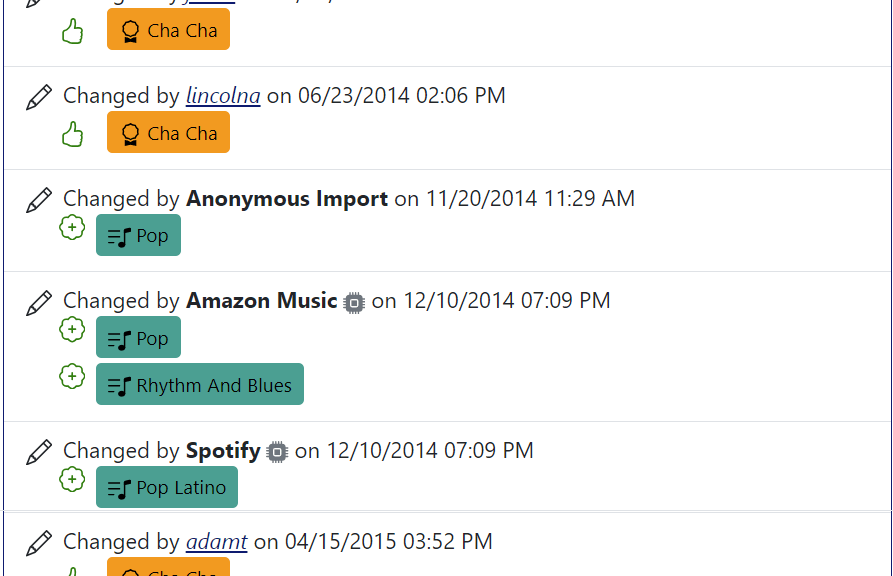
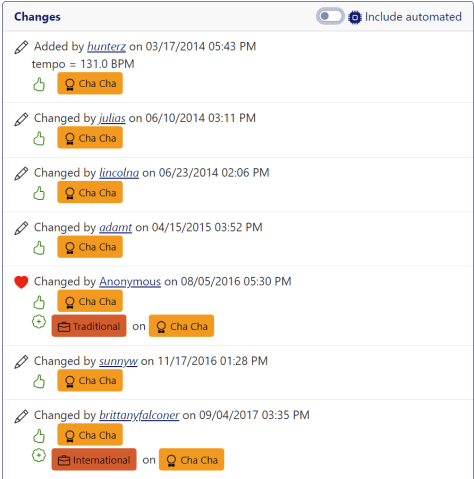
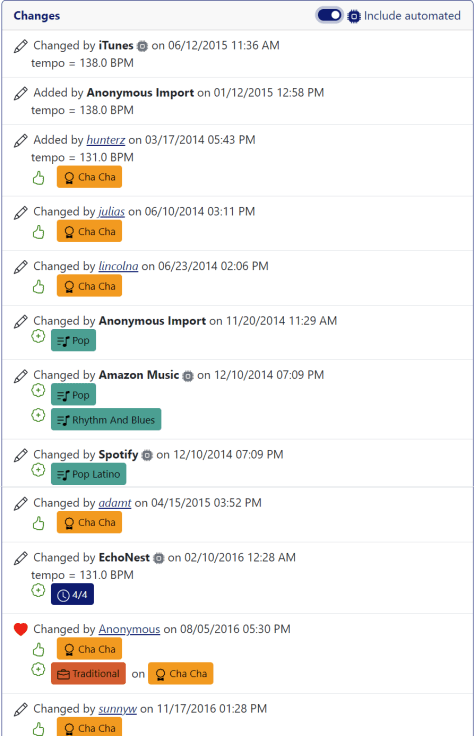
My original implementation of the music4dance voting system included weighted voting. The idea being that an expert in a particular dance style could vote on that style, and that vote would count more than the average community member’s or a list the system ingested from the internet. In practice, I weighted the lists that I got from friends and friendly DJs higher, and everything else got a single vote. A decade or so in, when I realized that I wasn’t getting dance teachers and professional DJs breaking down the figurative door to spend time recommending songs to dance to, and my original weightings were stale enough as to be counterproductive, I wrote some code to go through and normalize all votes to be of equal weight. So we are now in a place where all Dancers, Djs, and web lists get the same weight vote.

Wait – what are you talking about?

In case you haven’t played with this part of the system and are completely confused by the above, here’s the TL;DR – The core of the music4dance catalog is a system that encourages dancers to vote on which songs they like to dance to a style of dance. The more I can encourage folks to participate in this, the more useful it is to search for something like the highest-rated Cha Chas between 100 and 128 BPM. Check out the help page and this post for more info.

What now?

Several things got me thinking about this again, and since the system is still in place to weight votes other than “one,” and

First, votes in the system are dominated by lists that have been ingested and not carefully checked, so there is more chaff than I would like. My assumption is that anyone who takes the time to log into the system and vote a song either up or down on a dance has put more thought into that decision than the random list, and could reasonably be weighted higher than average.

Secondly, I have communicated with a number of amateur DJs and dance coordinators who use music4dance. Many of these power users don’t vote a song up until they’ve played it for their dancers and it’s been a success. Should they get n votes (representing some average of the dancers they are spinning for)?

And finally, one of the DJs I’ve been talking to suggested it might be nice to be able to double- or triple-vote, either up or down, songs he thought particularly suited to a dance (or not).

Any of the above would be pretty easy to implement, but I’m torn on adding completely to an already complex system. So, this is definitely something I would like to get more feedback on before moving forward. What do you think?

Step of the Month:

As I noted last time, I’ve traditionally closed out these posts with a generic ask to check out the contributions page and to please send feedback on anything in the post or your general thoughts. That’s been less effective than I like, so I’m pivoting. Each month, I’ll choose one specific ask that may or may not be on the contributions page lists, but would really help keep music4dance and the community strong. I’ve decided to call this section “Step of the Month” – a play on dance steps and steps to help – and see if that gets a response. If the response is to hold your nose and run away from plays on words, please let me know that, too.

The “Step of the Month” for April is to vote on songs that you like to dance to. This will make the catalog more useful for everyone.

Thanks, everyone, for your continued support.


Dance Tags

Dance tags are the heart of the music4dance database. They are the glue that holds dance styles and songs together. These tags are crowd-sourced from our users, our friends’ catalogs, and from public sources. The more that our members vote on dances, the more diverse our catalog will become. There are a number of places…

Updated Feature: Search History

As promised, I’ve done a bit more thinking about how to help folks who are going through long lists of search results, possibly generated by complicated searches. Most of what I ended up doing centers on a feature I’ve been calling “My Searches.” I realized as I started digging into this that I had already…

Updated Feature: Search History

As promised, I’ve done a bit more thinking about how to help folks who are going through long lists of search results, possibly generated by complicated searches. Most of what I ended up doing centers on a feature I’ve been calling “My Searches.” I realized as I started digging into this that I had already made some improvements to this feature based on feedback. But I never got around to blogging about that, so if you haven’t looked at this feature recently, it’s quite a bit different.

What is My Searches?

As you may have noticed, I haven’t been very consistent in the terminology I use for this feature. In previous posts and on the help page, I’ve called this feature “Saved Searches,” and in the user interface, it’s called “My Searches.” It is also easy to look at this as a search history.

If you’re signed in, music4dance saves your searches, and you can see the list of the most recent searches you’ve done in the “My Searches” menu under the profile menu in the top right of the page. I don’t remember exactly when I implemented this feature, but the last major update was in 2022, and I’m guessing the initial implementation was several years before that.

Improvements:

A couple of things I added to make this feature more manageable were to allow you to delete searches you’re not particularly interested in and to associate each search with the Spotify playlist it was created from. In this most recent round, you can also filter on searches that you’ve created Spotify playlists from.

Based on feedback about returning to a specific page in a search, the system now stores the most recent page you’ve seen in each search, which will appear in your list as a separate button.

While I was thinking about this, it occurred to me that one of the biggest issues with this feature is that people don’t know it exists. So, under the Tools menu, I added a “Search History” item and a “Resume Search” item. If you’re signed in, “Search History” just takes you to the “My Searches” page, and “Resume Search” takes you to the most recent page of the last search you ran. If you’re not signed in, you see a message to register or sign in to use the feature.

I’ve also added a “Delete All” option to remove all your searches from the database.

What’s Next:

I’ll likely pause on this feature for now, but please let me know if there are any aspects that would work better for you. Some of my thoughts:

  • I only show the top 250 most recent or most used searches. I could make this pageable like search results.
  • I only do this for non-trivial searches, so if you’re going through all the Waltzes in the catalog, you won’t see the search in your saved searches, and the new menu item will take you to your most recent “non-trivial” search, not the full list of Waltzes.
  • I could enable opting out of this feature and not store your searches.
  • I could enable adding searches to your favorites and filter on favorites (which gets a little closer to “Saved Search” vs. “Search History.”)

Step of the Month:

I’ve traditionally closed out these posts with a generic ask to check out the contributions page and to please send feedback on anything in the post or your general thoughts. That’s been less effective than I like, so I’m going to pivot. Each month, I’ll choose one specific ask, which may or may not be on the contributions page lists, but would really help keep music4dance and the community strong. I’ve decided to call this section “Step of the Month” – a play on dance steps and steps to help – and see if that gets a response. If the response is to hold your nose and run away from plays on words, please let me know that, too.

The “Step of the Month” for March is to please follow music4dance on Spotify. This helps gain visibility and attract new participants to the community.

Thanks, everyone, for your continued support.

Is music4dance becoming too popular?

I first published music4dance in 2013 and, within a year or so, started seeing traffic measurable in the thousands of active users per month. Usage plateaued there for over a decade, but last year, the numbers started climbing rapidly – into ranges better measured in tens of thousands. Now these are very rough measures from analytics, and there are some conflating issues which I’ve noted on my tech blog if you’re interested. And, very importantly, there has been a steady increase over the years of highly engaged users – those of you who vote on dances, email me with issues, and generally keep me mostly in line with dance knowledge.

In any case, the issue at hand is that music4dance has never paid for its own server costs, which has been fine with me in the past, because I get enough out of running the site that I am willing to cover the server costs, and I count my time as well rewarded by the support of the community. However, running a site open to the public has the quirk that expenses can be unbounded as traffic scales, or conversely, the site can slow down as traffic increases.

Music4dance has both of those problems. I haven’t done the engineering work to allow all resources to scale with usage. So things will slow down as more people use the site, possibly to the point of making it unusable, depending on the number of users and what they are doing. On the other hand, some resources are unbounded, such as network traffic costs, so I’ve seen costs spike.

Now, this would all be good if revenue scaled with usage, as an order-of-magnitude or more increase in revenue from both ads and subscriptions would not only cover current costs but also let me put in place some of the things that make a site scalable. However, revenue is not scaling at the same pace as traffic.

Ad revenue has grown by less than double, and since it’s only ever covered a small fraction of my costs, that’s extremely disappointing. I suspect that many people have ad blockers running, and I recently noticed that running my browser in incognito mode appears to act as an ad blocker, so many people may just not be seeing ads. Besides, ads uglify the site.

Subscription revenue has increased over the last year (thank you, everyone, who has subscribed or renewed, I really appreciate the support). And also thank you, everyone, who has spread the word and helped create the “problem” I’m dealing with now – please keep it up; the last thing I want is for usage to go down as the solution.

Given those two factors, I’m going to put on my (very shabby) marketing hat and start moving the site to a purely subscription-based model rather than the current hybrid ad and subscription model. Let’s see what we can do about getting some of the wonderful dancers who use the site regularly to add a premium subscription to music4dance to their budgets. To this end, I’m reducing the number of pages that show ads and replacing them with an obvious (but hopefully not too annoying) plea to create an account and upgrade to a premium subscription. If this works, I’ll eventually remove external ads completely.

Why am I telling you all of this?

  • If you are a premium subscriber and start seeing new messages asking for your support, please let me know – that would be a bug. My promise to premium subscribers to keep the site ad-free for them is intended to include this kind of “internal” advertising as well.
  • If you aren’t a premium subscriber yet but get something from the site, please consider subscribing.
  • If you find these nudges annoying and would prefer to support the site in another way (or already are), please get in touch with me. For instance, I had considered writing code to drastically reduce the number of nudges for folks who cast many votes or add many songs per month. But I think we can accomplish this manually for now, and I’ll write the code if it becomes an issue (and would be very happy to do so).
  • Since this whole line of reasoning is based on server load, please let me know if you’re seeing significant sluggishness when using the site. I’m especially interested in which pages you notice and when this happens. I am working on ways to reduce those issues without drastically increasing costs, and I can be more effective in my efforts if I have actual reports of sluggishness.

Thanks again to everyone who is already contributing to music4dance in one way or another. I hope this wasn’t too in the weeds of the business of running the site. I promise next time to get back to some fun features of the site or to an observation about music and dance.

As always, please let me know if you have any thoughts about the subject of this post or the site by commenting below or using other feedback mechanisms listed here. And, as previously noted, if you enjoy the site or the blog (or both), please consider contributing in whatever way makes sense for you.

New Feature: Go to Page (or I want to get to the 50th page in 77 pages of Waltz results)

One response to a recent post about Advanced Search options was:

One thing I would like on the website in general is: I am someone who is slowly making my way through all of the dance music selections for the dance styles I’m interested in. I would like it very much if there was a way I could go directly to the page at which I stop instead of having to navigate slowly to the page I want. For example, if let’s say I stop on page 50, and when I return to the task again at another time and want to start on page 51, it takes many clicks to get there.

I responded with ways to hack the URL to reach a particular page in search results, and I still think saving the URL via a browser bookmark or your note-taking system of choice is probably the best answer to the specific question.  The URL encodes all of the details of the search, including the page that you’re currently on, so you get right back to where you left off.

However, the pagination system is a feature I implemented in 2012 and haven’t revisited1 in detail since. At the time, the default pagination control that came with the UI library I was using worked perfectly well for the at most dozen (and generally more like two) pages of search results. That’s obviously not the case anymore.

I have been noodling with moving to an infinite scrolling system. This is the way many sites have moved to when presenting search results, and it would solve some other issues I’ve been having with limitations of the core indexing system I’m using. So, besides nudging me towards a more obvious way to go to a specific page in the search results, this comment may have stopped me from investing in an alternative scheme that would have made this even harder. Thank you!

I am going to continue to think about this some more. Including options like making the “my searches” list encode the page that you were last on. I don’t want to keep the page as a core part of the saved searches, since I want to show you the searches you do most frequently, but this shouldn’t prevent me from keeping a separate field for the most recently visited page for each search.

But the absolutely straightforward answer is to replace the textual indication of what page you’re on with an editable number. I did that, so now hopefully new users can easily get to a specific page in their results without digging too deeply.

Image of search results footer with editable page number

Just type the page you want to in the edit control, press Enter/Return, and the new page will load.

As always, please let me know if you have any thoughts about the subject of this post or the site by commenting below or using other feedback mechanisms listed here. And if you enjoy the site or the blog (or both), please consider contributing in whatever way makes sense for you.

  1. Ironically, I’ve re-implemented the exact same system a couple of times, once when moving to Vue.js, and again when moving to Vue3 and BootstrapVueNext. Even more ironically, getting the pagination control to work correctly in BootstrapVueNext was my first major contribution to that project… ↩︎

What is Your Favorite music4dance Feature? (2024 Edition)

I am in the middle of another substantial rewrite of parts of music4dance.net. This is why you haven’t seen much blogging or new features recently. Sorry! In any case, I should ask this question at least once a year: What do you like about music4dance, and how do you use the site? As I rework…

What is Your Favorite music4dance Feature?

I’m in the middle of doing a substantial rewrite of music4dance to modernize it and, hopefully, clean up the code enough that I can start adding new features without breaking things.  I had originally intended to keep all of the functionality of the site as I moved forward.  But this has been a bigger undertaking…

Advanced Search

The advanced search form can be found by clicking on the “Advanced Search” item in the “Music” menu or by clicking on the “Advanced Search” link on the song list page. Text Searching If you want to search specifically in certain fields, you can click the “more” button in the keywords section and get some…

The Dancers I DJ for don’t enjoy long songs. How do I find good Salsa songs that are under three minutes?

Filtering on song length is one of the most requested/appreciated features from the DeeJay/Music coordinator crowd. It’s also one of the first features I implemented in a round of requests I received from exchanges from this segment of the music4dance community – you can read about that in this post.

Since then, it has come up quite a few times, mostly as a “hey, this is one of the things I really love about music4dance,” and once or twice as a “it would be great if you implemented this feature,” in which case I get to gently (but gleefully inside) steer the questioner to the “Advanced Search Page.”

Advanced Song Search Page

I’m bringing this to your attention now because I originally implemented this feature on the cheap. I’m only letting one filter between a minimum and a maximum number of seconds (which is what I store internally). Since it is such a recognized feature, it occurred to me that it might be time to put a little polish on it. My original idea was to have a minutes/seconds control for the minimum and maximum, since that’s probably what the humans are thinking in – that way they don’t have to translate to seconds. It’s not like they can’t do the math, but if this feature is widely used, I should make the experience smoother.

Which leads me to some questions, especially if you are a DJ or music coordinator (formal or informal):

  • Would you prefer to filter on minutes/seconds rather than seconds?
  • Do you use sorting on length? (I didn’t even remember that for certain that I had enabled that until I checked) It seems that if you were to use that feature, it would be good to include the length in the results table, right?
  • Is there some other aspect of searching, filtering, or sorting on song length that could be improved?
  • Are there any other related features you would like to see when building a playlist for your dance?

And some questions for the rest of you:

  • Do you use this feature – possibly in a different way than I described, for different reasons?
  • Can you think of other things you’d like to be able to search, sort, or filter on, or in a different way?

And for everyone – since at least some part of the community has been interested in the filter on song length feature and didn’t find it without asking, any thoughts on how I could make it more obvious?

As always, please let me know if you have any thoughts about the subject of this post or the site by commenting below or using other feedback mechanisms listed here. And if you enjoy the site or the blog (or both), please consider contributing in whatever way makes sense for you.

New Feature: Filter by Song Length

If you’re trying to get a playlist together for a social dance, it would be nice for the songs to be a reasonable length for your audience.  I realize that DJ tools will let you manage this in multiple ways, but sometimes it’s just easier to start with songs in the length range you’d like. There are…

Advanced Search

The advanced search form can be found by clicking on the “Advanced Search” item in the “Music” menu or by clicking on the “Advanced Search” link on the song list page. Text Searching If you want to search specifically in certain fields, you can click the “more” button in the keywords section and get some…

Search like Google Part III: Advanced Search – The Best of Both Worlds?

Update (July 2024): This underlying search mechanism described in this series of posts is still in place and functions as described here, but the user interface has changed. Please see the Simple Search and Advanced Search documentation for how the current user interface works. I’ve just updated the music4dance site with the remaining features for…

Ask music4dance: When was this song added to the catalog?

Someone recently asked me to add a feature that shows when a song was added to the music4dance catalog. It turns out this feature already exists, but the fact that this person didn’t realize it means it isn’t as obvious as it should be. This is especially true, given that the questioner demonstrated she was a fairly sophisticated user of the site through other questions and comments in the same thread.

I have some ideas for how to expose this functionality, but I’d like your feedback before I dive in. I’d also like to get a sense of how interested you are in this information and how you’d like to use it.

What I have:

I’ll start by mapping out what I’m keeping in the database. In my internal format, I keep a record of every time a song is changed, including who made the change and (of course) what the changes are. It is too expensive to index all this information, so it is available on the song’s detail page, but only a few things can be quickly looked up for filtering and sorting the song list. These are as follows:

  1. The date that a song is originally added to the database
  2. The most recent date on which the song was modified (including by the system)
  3. The most recent date on which a song was edited by a user
  4. The most recent date that someone took the time to enter a written comment on the song

What you can do with it:

The easiest way to use this information (other than looking at the change log on the song’s details page), is to go to the New Music page. This will let you see the most recent songs based on when they were added, changed, or commented on. I find this useful as a quick check to see whether people (and bots) are successfully adding and making changes to songs. If the things at the top of the changed list are more than about a day old, it’s a good indication that I broke something. I also think this is good for users who are looking for new music to see what’s up – but now that I’m looking at that page with fresh eyes, I feel like it could benefit from filtering by dance style, like the Holiday Music and other similar pages.

Image of the new music page

To go to the next level, you can open the Advanced Search page and search/filter a song list any way you like, including by dance style, and then sort it by “When Added”, “When Modified”, “When Edited”, or “Comments.” Modified and Edited are subtle variations on Changed, which I’m not going to dive into here, but feel free to play with those and let me know if you think I’m just adding complexity for no reason.

In general, the last column in the desktop version shows information about the date you’re sorting on. The only indication I’m giving on smaller screens is the order in which the list is presented.

Where to go from here:

Between the original question and writing this post, I have had a number of thoughts about what I would improve. But please pause for a moment before you read on, as I’d like your ideas unpolluted by my ramblings.

  • Add some indication of the sort-ordered date on mobile.
  • Make the information that is shown about songs in the search results list configurable – possibly separately for mobile and desktop (this one would be part of a larger project).
  • Add dance filtering to the New Music page. And/Or add an “advanced search” button to those pages that pre-populates the advanced search form.
  • Distinguish between Modified and Edited on the New Music page.
  • Provide the option to view the full edit history on the song details page.
  • Add the ability to filter between two dates for any of the indexed date types (e.g., I want to see all cha-chas that were added before 2015)

Publication date of a song:

When I first read the message that prompted this post, I thought I was being asked to show the date the song was published. That’s a question that I’ve been asked quite a bit, and the answer is that it’s harder than it seems. In general, people are asking for the date the song was first released as a single or on the first album it appeared on. But since the data I have access to is often a “Best Of” or “Ballroom Mix” album, and the date I can see is the album’s, not the song’s, I haven’t figured out a way to reliably get the information we want. This may be a matter of hooking up to another music database like MusicBrainz, but that’s a pretty big lift, so it’s not part of my immediate plans.

However, I have used various sources to tag songs with the decades they’re associated with; this is more of a fuzzy style idea than anything to do with the song’s release date, but that’s often what I want: 70’s Cha Cha or 50’s Slow Foxtrot.


As always, please let me know if you have any thoughts about the subject of this post or the site by commenting below or using other feedback mechanisms listed here. And if you enjoy the site or the blog (or both), please consider contributing in whatever way makes sense for you.

Song Details

The music4dance song details page contains all of the information that we have gathered about a song, including tags and dances that you have may have added. Below is a snapshot of a song details page for “(I’ve Had) The Time of My Life” as seen by a user “Charlie” while he is editing it.…

Advanced Search

The advanced search form can be found by clicking on the “Advanced Search” item in the “Music” menu or by clicking on the “Advanced Search” link on the song list page. Text Searching If you want to search specifically in certain fields, you can click the “more” button in the keywords section and get some…

Ask music4dance: How do I find a song that people can dance West Coast Swing and Foxtrot to, or Cha Cha and Rumba, or…

Some of the most vocal members of the music4dance community are folks who either DJ for their studio’s dances or help build the playlists for their community dances, or some variation of the two. The common thread is that they’re using music4dance at various points in their processes and have been kind enough to share the details with me. This has resulted in a number of features that I am sure help more members of the community than my original interlocutor. Thanks again to everyone who has taken the time to share their experiences with music4dance.

The topic at hand is a recent email expressing appreciation for the ability to use the advanced search feature to find songs that can be danced to two or more different dance styles. I realize that I last blogged about this feature in 2015, before I moved the advanced search features to their own page. I missed this post in the review I went through last year to try to update some of the most out-of-date posts and archive the old ones. So I appreciate the reminder.

A little bit of personal history:

When I was first learning to dance, my teacher tried to get me up and able to social dance quickly, including several smooth dances and several rhythm dances. That was totally and completely beyond my capacity, and I spent the better part of a year taking lessons, occasionally showing up to Friday night dances and stumbling through a song or two, but not feeling very good about it. And stepping on too many toes. I clicked in with dancing when a different teacher took me on and convinced me to enter the in-studio competition with an East Coast Swing “solo” piece (what I would now call an exhibition piece – she choreographed the dance to a specific song. We put on costumes and acted out a little scene as part of the dance – pretty close to what most of the performances on Dancing With the Stars are.

With that experience, I graduated to a comfort level with East Coast Swing that I could show up to a dance and dance that one style for the one in 10ish songs that the DJ played. But wait – there is some overlap between East Coast Swing tempo and Slow Foxtrot, at least for social dancing. And the music is of a similar style, since these dances “grew up together” in the Swing Era. And even better – the people dancing Foxtrot were following line of dance around the edge of the dance floor, so we could tear up the middle of the floor with a swing and not disturb the “official” dance. Now I could be up on the floor for one in 5ish songs, and things were starting to feel better. And the rest is history.

How can music4dance help?

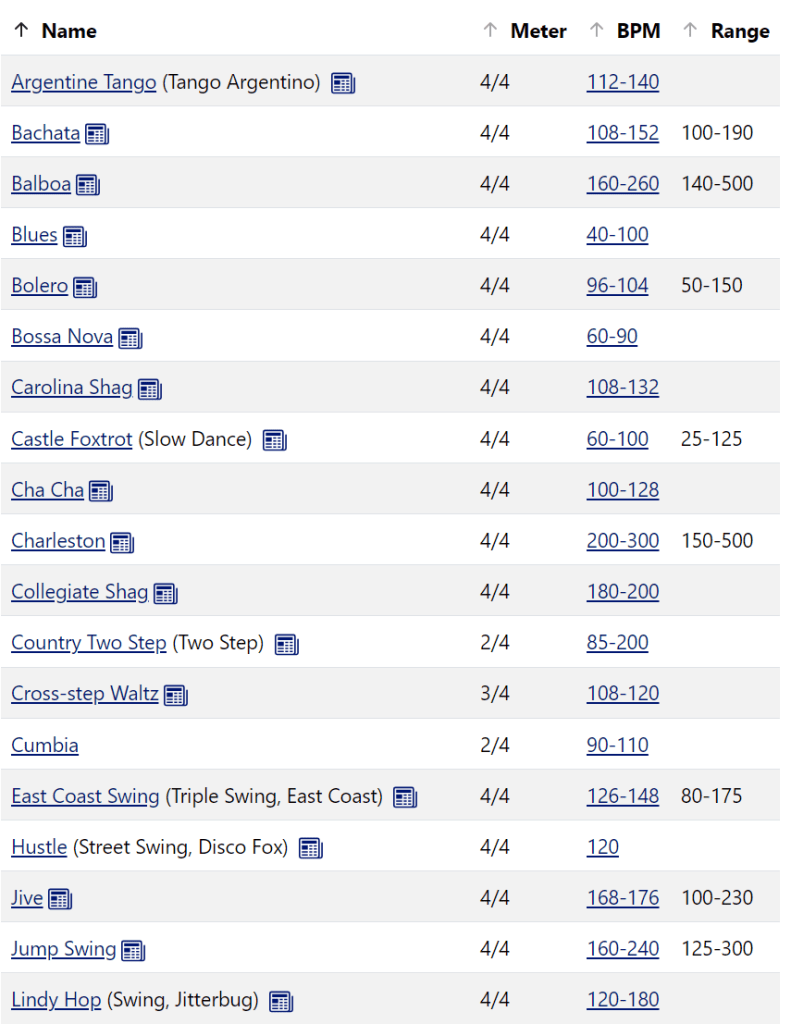
But back to the topic at hand. There is a strong motivation when picking songs for a social dance where many styles are represented (which is often true in a traditional ballroom setting) to cater to music that lets newbies dance what they know.  Music4dance makes this easy. If you want to find songs that fall in the overlap between East Coast Swing and Slow Foxtrot, just go to the Advanced Search page and choose each of those dances in the Dances section and click on All (you want the intersection, not the union). Or click here. Then you might want to whittle down that list to the fast end of the Slow Foxtrot and the slow end of the East Coast range – say 128 to 132 BPM, and you get a manageable list of songs to browse through. You can listen to snippets of most songs directly in music4dance. Or, if you’re a premium subscriber, you can export the list to a Spotify playlist and listen to the full songs.

There are a lot of combinations of dances this technique works for, including the dances from the title of this post – West Coast Swing and Slow Foxtrot or Cha Cha and American Rumba are just a couple. Take it for a spin and let me know what you think. And let me know if you use this alongside other features. Or just drop me a line with how you use music4dance. I always read and respond to feedback.

As always, please let me know if you have any thoughts about the subject of this post or the site by commenting below or using other feedback mechanisms listed here. And if you enjoy the site or the blog (or both), please consider contributing in whatever way makes sense for you.

Create a Spotify Playlist

One of my initial goals with music4dance was to be able to create playlists to dance to.  I can finally say that I’ve got this working in a way that is close to my original vision at least for Spotify. The idea is, for instance, that I’d like to build a playlist of Foxtrot songs…

New Feature: Filter by Song Length

If you’re trying to get a playlist together for a social dance, it would be nice for the songs to be a reasonable length for your audience.  I realize that DJ tools will let you manage this in multiple ways, but sometimes it’s just easier to start with songs in the length range you’d like. There are…

Add to a Spotify Playlist Directly from music4dance

A number of people have told me over the years that they create custom Spotify playlists by browsing the music4dance catalog and selecting individual songs. I’ve had ambitions to do all kinds of things to create and manipulate playlists. But it occurred to me, based on a recent conversation, that just the ability to easily…