Update (July 2024): This underlying search mechanism described in this series of posts is still in place and functions as described here, but the user interface has changed. Please see theSimple Search and Advanced Search documentation for how the current user interface works.
Give both a try and let me know what you think. I’ll leave both the new and the legacy search capabilities up on the site for a bit so that you can compare and contrast, but I’m working hard to test and get all of the functionality moved over to the new system so that I can delete the old one.
Bug reports are welcome here. If you end up having to use legacy search for any reason, please let me know. Also, if you land on pages that are marked ‘legacy’ without having gone to them explicitly, a bug report or email would be really helpful. And as always please submit any general feedback or suggestions here.
Update (July 2024): This underlying search mechanism described in this series of posts is still in place and functions as described here, but the user interface has changed. Please see theSimple Search and Advanced Search documentation for how the current user interface works.
Give both a try and let me know what you think. I’ll leave both the beta and the legacy search capabilities up on the site for a bit so that you can compare and contrast. Bug reports are welcome here. And as always please submit any general feedback or suggestions here.
Update 2024: The content of the post is still generally accurate. There is a more recent post that outlines a new feature that adds yet another way to narrow down songs that have “Prince” in the artist’s name. New Feature: Improved Text Searching
I, like many, am mourning and listening to Prince‘s music. Over and over again.
Since I’ve been thinking a lot about music and partner dancing recently, this lead me to think about what I would dance to each song. Especially when Leader of the Band popped up in my playlist and screamed Cha-Cha at me. Of course a lot of his seminal work has more of a blues feel that I would associate with West Coast Swing (or possibly even more directly blues dancing). But there are certainly some things in his catalog that one might Quickstep to (Let’s Go Crazy) or dance a Slow Foxtrot (Strollin‘) to.
Here’s a link to the list of Price songs currently in the music4dance catalog. If you’ve got other favorites (along with what you would dance to them) let me know by responding to this post or sending feedback and I’d be happy to add them. Or sign in and vote on what style you would dance to the songs already in the catalog.
The Prince Feature
One of the things that I noticed as I was looking for Prince music in the music4dance catalog was that I hadn’t implemented an artist page of any kind. You could search for Prince but you would both get everything I had catalog by Prince and everything by Prince Royce songs with Prince in the title. So I did a quick fix – if you click an artist’s name you’ll be taken to a page with a list of the first 100 songs I’ve catalog by that artist. Since I’m only tracking artist by the full name this has a couple of implications, one of which is that Leader of the Band won’t show up under Prince since the artist is actually “Sheila E. featuring Prince and The E Family.”
You can, of course, still search for Prince and manually go through the songs to find the ones that actually involve Prince, but that’s obviously not the perfect solution. How much does this matter to you? Is it important to have a more specific idea of artist when you’re sorting through songs to dance to?
As always, please send me feedback or just respond to this post with any issues or ideas.
Update (July 2024): This underlying search mechanism described in this series of posts is still in place and functions as described here, but the user interface has changed. Please see theSimple Search and Advanced Search documentation for how the current user interface works.
I am continuing to rebuild the music4dance database capabilities in the more intuitive style of current search engines like Google and Bing – the initial attempt at this is documented in this post.
Auto-Complete
Auto-complete is something everyone expects when searching these days. So if you were to type “Peab” into the search box on the simple search page you should see suggestions like the following pop-up:
Peabody
Peabo Bryson
Tonight, I Celebrate My Love (feat. Peabo Bryson)
Peabo Bryson & Regina Belle
Peabo Bryson And Roberta Flack
Love and Rapture: The Best of Peabo Bryson
And just like Bing or Google, clicking on the selection will take you to a list of songs that contain the selected text.
The thing that is a little different for music4dance than a generic search is that one might want to do combinations of things like a fragment of a title and a dance style name. I haven’t figured out an easy way to do that, but as always I’m open to suggestions.
Filter by Dance Style
But I can fall back to the original way that I landed on for just searching within a single dance style. So now on the Simple Search page, you can select a dance style from the drop down to the left of the search box and we’ll just show you results for that dance style. So if you select Cha Cha and then type “tea” into the search box you should get only songs that have the word tea somewhere in the description that have also been tagged as Cha Cha.
Update 2024: While the UI is a bit out of date in this post, I’ve preserved the mobile improvements discussed here (and continued to move towards a more useful mobile experience with additional improvements).
Most of the time that I use music4dance it’s on desktop computer, but I certainly want access to all of what it can do on my phone and tablet. And I have tried to take what user interface designers call a “Mobile First” approach whenever possible.
But I noticed a while back that there are a few things that just weren’t working as well on smaller devices as I would like. Several of them were on the core song list pages, which is particularly important.
So I finally took a couple of days off from other things and reworked these issues.
The Play Menu
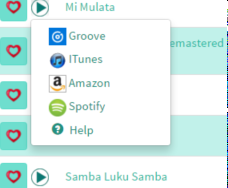
The play menu (which is documented here) is now a modal which allows for bigger buttons and the ability to control the sample being played.
Play Menu (on the old site)Play and Purchase Controls (new and improved)
Dance and Tag Menus
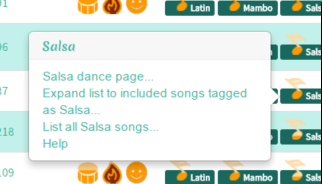
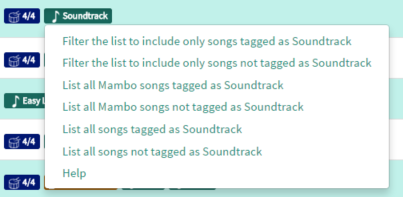
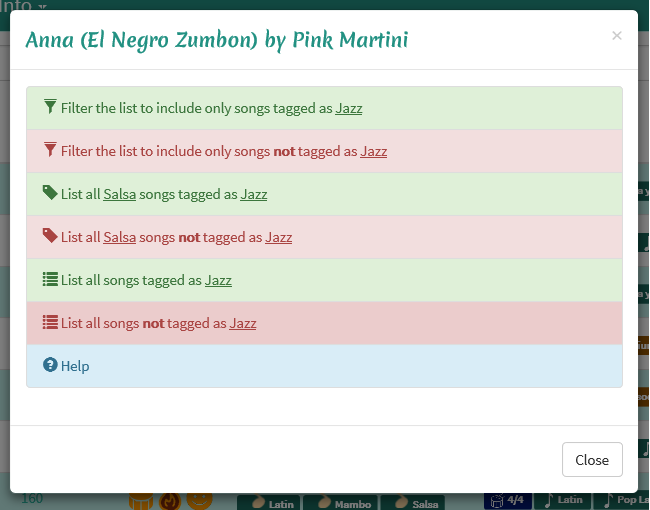
I’ve also converted the dance and tag menus (documented here) to modals. This let me make the buttons bigger as well as adding some styling that I hope will let you navigate through options more easily. The large chunks of text in the old interface were hard to distinguish even for the person that wrote them.
Dance Menu (on the old site)Dance Information (new and improved)Tag Menu (on the old site)Tag Information (new and improved)
Let me know what you think. Do you prefer the before or after? Are there other aspects of the site that you find difficult to use on a small device? Let me know by responding to this post or sending feedback.
Update (July 2024): This underlying search mechanism described in this series of posts is still in place and functions as described here, but the user interface has changed. Please see theSimple Search and Advanced Search documentation for how the current user interface works.
One of the things that I’ve had a lot of fun with is building a sophisticated search engine where I (and you) can do things like find songs that someone has tagged as Waltz and someone else has tagged as Foxtrot. Or find all swing songs that are in a particular tempo range. There are lots of neat things that you can do with the Advanced Search system if you’ve got some knowledge of dance and music and want to dig deep into these corners of the music4dance catalog.
But what if you just want to search through the catalog the same way you would on Google or Bing? For instance, what if you’re looking for a song that has been tagged as Wedding and has the words “Love” and “Time” in it? With simple search you can just type Wedding Love Time into the search box and you’ll get some useful results. You can further refine the search by using some of the standard search modifiers like + and – and putting quotes (“) around phrases to be more precise about your searches (for instance try “First Dance” +Foxtrot +Rock). But if you’re the type that doesn’t bother with that on Google you should be fine not worrying about it here as well.
I’ve cross indexed the music4dance catalog with the EchoNest database and exposed some new features.
The most fundamental improvement is that EchoNest provides tempo and simple meter information. So I’ve been able to add tempo information to a number of songs that I didn’t have cataloged that way before. And I’ve also added the time signature tags to these songs.
But more importantly, EchoNest does some interesting analysis of the music to come up with some acoustic attributes to describe a song musically. They are:
Beat: An attempt to characterize the strength and consistency of the beat.
Energy: The intensity and power of the music – this is probably the most intuitive of the attributes.
Mood: A measure of the mood from positive or happy down to sad or angry.
I am representing each of these attributes as a graphical column headed with an appropriate icon (drum for beat, flame for energy and smile for mood). Each column is sortable both from high to low and low to high and when I have data for a song, the icon in that song’s row is ‘filled’ to a proportional amount. EchoNest provides a number from 0 .0 to 1 .0 and I translate that into icons that are 0 to 100% filled (in 10 bands).
More information on this integration can be found on the help page. Or just head over to the music library and start experimenting.
For instance, here is a snapshot of a list of songs that are tagged as “First Dance,” can be danced to some form of Foxtrot and contain the word “Love“. They are sorted by “Beat” from strongest to weakest. If you’re looking for a song to dance your first dance to and aren’t an experienced dancer, you probably want a strong beat.
What do you think? Are there other acoustic attributes that I should include? Would you like to be able to sort on multiple attributes on the same time or filter on one attribute and sort on another? These are all entirely possibly, but I need your help to prioritize these features. Please feel free to reply to this post or leave feedback with any thoughts you have on this set of features.
One of the things that I’m struggling with in the music4dance project is the pull between finding lots of recommendations for songs to dance to against the desire that those recommendations being in some sense ‘good.’ As I noted in my last post, more manual curating will certainly help.
Another way to attack this problem is to tune down the mechanical methods I’m using to find recommendations. So for now I’ve changed the default for most dance recommendations to only pull up songs that someone has explicitly noted are good to dance to that particular style. So, for instance, the Carolina Shag catalog doesn’t get polluted by songs that someone has tagged generically as ‘Swing‘ that happen to be a reasonable tempo to dance Carolina Shag to. And the top 10 lists for individual dance style pages are filtered the same way.
Hopefully this will give you a better start at ‘core’ songs that work for each dance style. Check it out and let me know what you think.
P.S. What if you’re interested in getting the broader range of recommendations? Say you’re looks for songs that might work to dance a style to that might not be quite the musical style that is normally danced to. There are a couple of things you can do. First, you can go to advanced search page and check the “Include Inferred” check-box. This will give you the old results where we pull in songs that are marked with a related dance style and are of an appropriate tempo. Or you can just do a tempo filter on the advanced search page and see what comes up…
A number of people have pointed out that my attempt to generalize the “rules” that I use to pick Ballroom music, especially slightly edgy ballroom music have caused the social music parts of the music4dance catalog to veer a bit (or more than a bit) off course. One way to solve this is to spend some time on each of the social dances and see if I can get some more concentrated people knowledge to help contribute to a better list.
And since I’m going to be taking Bachata lessons for the first time starting next week, that seems like a great place to start. I’ve pulled together a couple of the albums that the teacher recommended and some Bachatas from a few other sources to get an initial list together here. What do you think? Am I anywhere close to a decent list? What am I missing or what is on this list that you absolutely wouldn’t dance Bachata to?
The other thing I noticed is that it looks like Bachata has a broad enough history that it may make sense to either split them up (like I did with Tango) or maybe more reasonably start tagging them by sub-style?
Please feel free to respond to this post with song ideas or more general suggestions. You’re also welcome to sign in to the site and start voting on songs. And if you’re not a Bachata expert, that’s all right, there is plenty of room for improvement elsewhere in the catalog.
One of the first things that I wanted to do with the music4dance project was to build a system where dancers could vote on whether a song worked for a particular dance style. That morphed into something more like “do you like to dance style x to song y.” Which still seemed like a pretty reasonable system. And I started using heart symbols to show like/indifferent/don’t like for the dance style entries on each song.
But then Amanda (the music4dance intern) pointed out that there wasn’t any way to actually say that you liked or disliked a song. So we implemented a top-level like/indifferent/don’t like for each song and I used the same heart symbols. But then things got confusing, since you could vote to like to dance a particular style to a song as well as make a song as something that you like.
I still think that there is a value in both of these attributes. For me the overriding value of the like/dislike a song is to be able to dislike a song and not have to see it again. Especially for a song that I may have particular bad associations with – a song that was massively overplayed in a dance studio, for instance. These are particularly troublesome as they are probably overplayed because they are well suited to a particular dance style, so I certainly don’t want to exclude them from other people’s searches by voting them down for matching that dance style.
In any case, this came to a head while I was implementing the quick voting mechanisms where you can like/dislike a song anytime you see it in a list – any kind of search results or dance style details pages. Once I got that feature in, I saw that it was so much easier to like/dislike a song than it was to vote on whether you find a song dance-able to a particular style. And that made me sad, since I think the dance-able vote is much more interesting (and also why you would be looking at a site like this rather than a purely music rating/referral site).
So I added in the voting link to the songs in any list where there is a single dance being listed. This includes the dance style pages as well as any searches where you choose just one dance to search on (like for instance, this list of all of our East Coast Swing songs). And while I was doing that, I started using the shoe symbol rather than the heart symbol for voting which helps with the ambiguity.
Well this all works, and I’m reasonably happy with the results. But I’m not sure I’ve minimized the number of clicks that you would use on average. Should I assume that you like a song if you vote it up as a good Cha-Cha – you could still explicitly dislike it for those cases where you actually don’t like the song even if you agree that it’s a particularly good song to dance the Cha-Cha to.
Why don’t you give it a try and let me know what you think. Go to your favorite dance page (find them here) and try both voting on the songs as dance-able to that dance (by clicking the shoe icon) and liking/disliking them as songs (by clicking the heart icon) and let me know what you think. Feedback is always welcome via the music4dance feedback form or our company email info@music4dance.net.



 Beat
Beat Energy
 Mood
Mood

 music4dance