As an engineer, I have a rather extreme tendency to dive into code when trying to improve the site. That has resulted in some pretty cool features – Check out EchoNest Integration, Finding Foxtrot Music and Cross-referencing Dance Styles just to name a few. As a dancer, however, it’s pretty obvious that new content is the most important part of a site like music4dance. To that end, I’m going to keep new features to the minimum and concentrate on improving the content.
Last week I added descriptions to all of the “Other” category of dance styles, and I believe I managed to get some better content for both Polka and Country Two Step. I’m happy to take feedback on those dances from the experts, as neither of them land anywhere to my core proficiency. Also – if anyone is willing to tutor me on country dances in general, I believe I could get something similar to what I have for ballroom competition categories up and running reasonably easily.
Overall, I hope to bulk out descriptions and start adding new songs to the catalog on a more regular basis as well as delving a bit more into the relationship between music and partner dancing in the form of some more content rich blog posts.
Update (July 2024): This underlying search mechanism described in this series of posts is still in place and functions as described here, but the user interface has changed. Please see theSimple Search and Advanced Search documentation for how the current user interface works.
Give both a try and let me know what you think. I’ll leave both the new and the legacy search capabilities up on the site for a bit so that you can compare and contrast, but I’m working hard to test and get all of the functionality moved over to the new system so that I can delete the old one.
Bug reports are welcome here. If you end up having to use legacy search for any reason, please let me know. Also, if you land on pages that are marked ‘legacy’ without having gone to them explicitly, a bug report or email would be really helpful. And as always please submit any general feedback or suggestions here.
Update 2024: While the UI is a bit out of date in this post, I’ve preserved the mobile improvements discussed here (and continued to move towards a more useful mobile experience with additional improvements).
Most of the time that I use music4dance it’s on desktop computer, but I certainly want access to all of what it can do on my phone and tablet. And I have tried to take what user interface designers call a “Mobile First” approach whenever possible.
But I noticed a while back that there are a few things that just weren’t working as well on smaller devices as I would like. Several of them were on the core song list pages, which is particularly important.
So I finally took a couple of days off from other things and reworked these issues.
The Play Menu
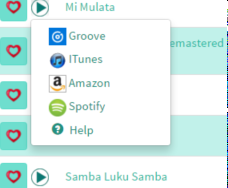
The play menu (which is documented here) is now a modal which allows for bigger buttons and the ability to control the sample being played.
Play Menu (on the old site)Play and Purchase Controls (new and improved)
Dance and Tag Menus
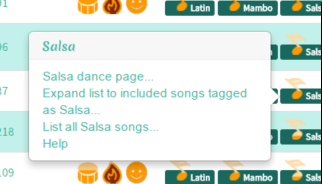
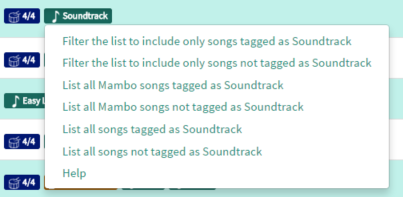
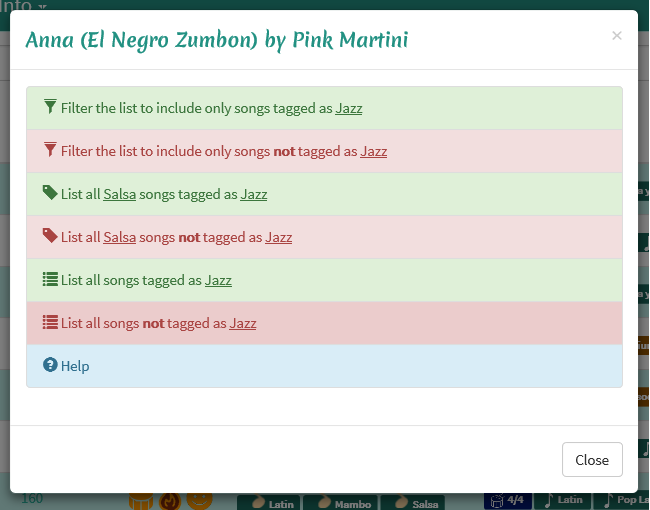
I’ve also converted the dance and tag menus (documented here) to modals. This let me make the buttons bigger as well as adding some styling that I hope will let you navigate through options more easily. The large chunks of text in the old interface were hard to distinguish even for the person that wrote them.
Dance Menu (on the old site)Dance Information (new and improved)Tag Menu (on the old site)Tag Information (new and improved)
Let me know what you think. Do you prefer the before or after? Are there other aspects of the site that you find difficult to use on a small device? Let me know by responding to this post or sending feedback.
One of the first things that I wanted to do with the music4dance project was to build a system where dancers could vote on whether a song worked for a particular dance style. That morphed into something more like “do you like to dance style x to song y.” Which still seemed like a pretty reasonable system. And I started using heart symbols to show like/indifferent/don’t like for the dance style entries on each song.
But then Amanda (the music4dance intern) pointed out that there wasn’t any way to actually say that you liked or disliked a song. So we implemented a top-level like/indifferent/don’t like for each song and I used the same heart symbols. But then things got confusing, since you could vote to like to dance a particular style to a song as well as make a song as something that you like.
I still think that there is a value in both of these attributes. For me the overriding value of the like/dislike a song is to be able to dislike a song and not have to see it again. Especially for a song that I may have particular bad associations with – a song that was massively overplayed in a dance studio, for instance. These are particularly troublesome as they are probably overplayed because they are well suited to a particular dance style, so I certainly don’t want to exclude them from other people’s searches by voting them down for matching that dance style.
In any case, this came to a head while I was implementing the quick voting mechanisms where you can like/dislike a song anytime you see it in a list – any kind of search results or dance style details pages. Once I got that feature in, I saw that it was so much easier to like/dislike a song than it was to vote on whether you find a song dance-able to a particular style. And that made me sad, since I think the dance-able vote is much more interesting (and also why you would be looking at a site like this rather than a purely music rating/referral site).
So I added in the voting link to the songs in any list where there is a single dance being listed. This includes the dance style pages as well as any searches where you choose just one dance to search on (like for instance, this list of all of our East Coast Swing songs). And while I was doing that, I started using the shoe symbol rather than the heart symbol for voting which helps with the ambiguity.
Well this all works, and I’m reasonably happy with the results. But I’m not sure I’ve minimized the number of clicks that you would use on average. Should I assume that you like a song if you vote it up as a good Cha-Cha – you could still explicitly dislike it for those cases where you actually don’t like the song even if you agree that it’s a particularly good song to dance the Cha-Cha to.
Why don’t you give it a try and let me know what you think. Go to your favorite dance page (find them here) and try both voting on the songs as dance-able to that dance (by clicking the shoe icon) and liking/disliking them as songs (by clicking the heart icon) and let me know what you think. Feedback is always welcome via the music4dance feedback form or our company email info@music4dance.net.
Update (July 2024): This underlying search mechanism described in this series of posts is still in place and functions as described here, but the user interface has changed. Please see theSimple Search and Advanced Search documentation for how the current user interface works.
Music4Dance was conceived to help dancers find music that inspires them to dance. My posts about this from last year are still right on point even if the screenshots are a bit out of date. I have been adding capabilities to the music4dance advanced search control as they are suggested and as time permits. And it got a bit out of control, so to speak. As of yesterday, that control looked like this:
And now thanks to some hard work by the fabulous music4dance intern, the advanced search form looks like this:
Much improved, no? Basic documentation is available here and we’ll be updating the rest of the affected documentation shortly. We’re also looking at other advanced search features. Saving your searches and making it easier to filter on songs that you have tagged are two of our top candidates. What else would you like to see? Please let me know by leaving feedback in the comments section of this page or via our feedback form.
Update (May 2024): Music4dance has evolved enough that this post is stale. Please check out the updated version of this post for current information.
The quick answer to this question is yes, definitely!
First, many of the songs in our catalog have been tagged with a tempo, so it is easy to get a list of suggestions. However, these are tempi that have been sourced from all over the web, so please use this as a first approximation rather than some kind of official source.
That said, it’s very easy to get a list of songs of a particular tempo. Just go to the song list page (the “Songs” item in the “Music” menu), choose the style of dance you’re interested in practicing [A] and click on the “More” button [B].
Then you can fill the minimum tempo (C) an the maximum temp (D), and click the search button (E) to get a list of songs.
If the list is empty we haven’t tagged any songs in that tempo range for that dance style. Which is the perfect segue into the another way to do this kind of search.
If you are competing in a particular category (International Standard, International Latin, American Smooth and American Rhythm), you can go to the info page for that category by clicking on the name of the category on the Ballroom Dancer section of the home page or at the bottom of the dance style page. The core of each of these pages is a table with the dances styles for that competition category and the competition tempo ranges. The tempo ranges are active links to just the kind of song search that I described in the last paragraph. Starting here will assure that you’ve started with the approved competition tempo range. Full documentation for the dance category pages can be found here.
Finally, if you are practicing a particular dance you can start from the dance style page (from the “Dances” item in the “Music” menu) and click on the dance style that you’re practicing. The tempo info link on that page will take you to the same table as the category page but with just the single dance style specified. Full documentation for the dance style pages can be found here.
Hope that helps. If you are interested in helping refine our catalog (by, for instance, adding ‘strict’ tags) please sign up for our upcoming beta via this feedback form, or use the same form to report incorrect tempi or other information in our database.
I’ve added a brief description of the tag cloud page, as well as modifying the documentation for the song list and dance style pages to reflect changes that I made to add capabilities to filter on tags. With this the documentation is roughly up to date with the code (a strangely odd feeling from a programmer’s perspective) and I’ll be rolling out a beta for user tags soon. If you’re interested in participating in the beta, please sign up via this feedback form.
One of the things that was difficult for me as a beginning ballroom dancer (even though I had decent amount of musical background) was to judge the tempo of a song at the level required to know if the song could be danced to in a particular style. I talked about the tool I created to help me with this in one of my early posts (Question 2: What dance styles can I dance to my favorite songs?) Today I’ve added some more complete documentation for the tempo counter tool.
Another thing that always bugs me is the relationship between the tempi of different dance styles. I created another tool to help me visualized the relationships between dances and also posted some detailed documentation for that tool today.
In my last post I showed you how to use the music4dance website if you already had a song in mind that you wanted to use for your first dance, and wanted to figure out which dance style(s) would work with the song. But what if you are particularly in love with one dance style or are just learning to dance one particular style and are looking for an inspiring first dance song in that style?
Let’s take a concrete example. Assume for a moment that you are learning to Rumba, so you’re looking for songs that will work for rumba but are also good songs for a first dance.
Choose Music->Tags from the menu at the top of the site by first clicking on Music (A) then on Tags (B).
Click on the “Wedding” tag (C).
A menu will pop up, choose the option “List all songs tagged as Wedding.” A list of all of the songs in our catalog that have been tagged “Wedding” appears. Since this list includes not only songs tagged as “First dance” but also “Father Daughter” and “Mother Son” tagged songs, let’s further refine our list to just “First Dance” songs.
Click on any “First Dance” tag (D) in the tags column, a small menu will pop up. Choose “Filter the list to include only songs tagged as First Dance.” You will now have a list of songs that have been tagged both as “First Dance” and “Wedding.”
But you are looking specifically for songs that you can dance the Rumba to. So click on the dance selector button (E) (All Dances) and choose Rumba (F).
You will now have songs that you can dance the rumba to that have been tagged as “Wedding” and “First Dance.”
The play button (G) on any song will give you a list of music streaming and purchase options, which at minimum will let you listen to 30 seconds for free to make sure this is the song you were thinking of at if you’re subscribed to one of the services like Spotify or Groove you can listen to the entire song.
You can click on the title link of any song (H) to get even more details including albums that contain this song.
Or click on the Tempo column header (I) to sort the songs by tempo.
Is the style of dance you’re interested in not included please leave a comment or take a few minutes to go through my dance classification survey and help me generalize this system to the style of dance that you know.
For many people it was so that they could dance at their wedding. Most especially so that they could enjoy the first dance but also perhaps for the Father/Daughter or Mother/Son dance. If you’re just starting to learn to partner dance it can be pretty intimidating to both learn to dance and try to figure out what the possible dances are for your favorite song(s) and to dig through lists of suggested wedding songs to find the ‘right’ one for the dance style that you’re learning.
The Ray Charles and Natalie Cole version of “Fever” should show up near the top of the list (E), if not try sorting by Artist by clicking on the Artist column header (F).
The row already shows you some suggested dance styles in the dance column (G) including Foxtrot and Swing. And you can see that others have tagged (H) this as a good Wedding and First Dance song.
The play button (I) will give you a list of music streaming and purchase options, which at minimum will let you listen to 30 seconds for free to make sure this is the song you were thinking of at if you’re subscribed to one of the services like Spotify or Groove, you can listen to the entire song.
You can click on the title link (J) to get even more details including albums that contain this song.
Hope that helps. If you can’t find your song in our catalog, let me know what it is by commenting on this thread and I’ll see if I can add it.
Next time I’ll walk you through the other direction – starting with a dance that you know and finding music that others have identified as good First Dance songs for that style of dance.





 music4dance