
The Dance Tempi page is a table of partner dances with their meters and tempos. You can find it under Tools > Tempi (Tempos) in the menu at the top of every page on music4dance.net. It shows how tempo, meter, and dance style fit together, using the tempo rules of several dance teaching and competition organizations as well as more informal social dancing tempos.
You can filter and sort the table to answer questions like “which is faster, a Samba or a Paso Doble?” or “what does the NDCA say the tempo of a Viennese Waltz should be?” You can also use it as a jumping-off point: every tempo in the table is a link to a list of songs for that dance at that tempo. We haven’t vetted all of those songs as strict competition tempo, so treat those lists as a source of ideas rather than a definitive guide.
Once you have the table the way you want it, you can copy a link to it and share it, or bookmark it and come back later.
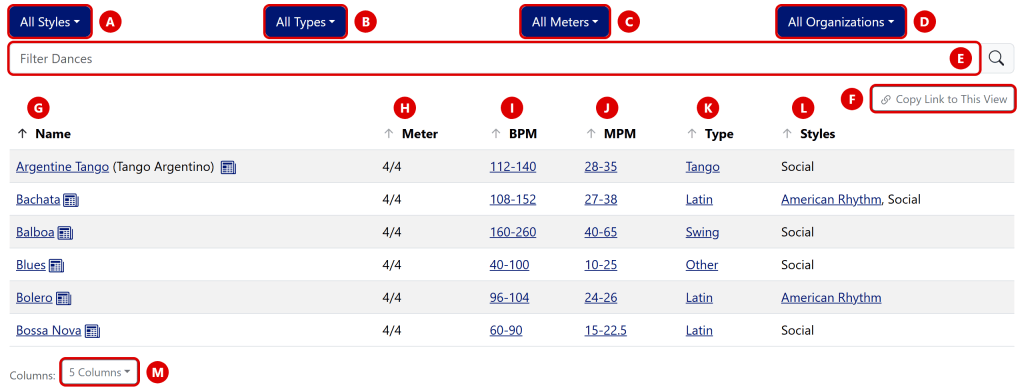
Filters
The four drop-downs across the top (A through D) narrow the table to the dances you’re interested in. Each one works the same way: check the options you want, or use Select All to check or clear the whole list. The button shows what you’ve chosen, like “All Styles”, “Latin”, or “2 Meters”.
Each option in a drop-down shows how many dances you’d see if you chose it, given what’s selected in the other three. Options that would show at least one dance are in bold, and options that would show none are grayed out. You can still check a grayed-out option. It just won’t add anything to the table until you change one of the other filters.
The filters combine, so choosing Latin as the type and 2/4 as the meter shows only the Latin dances in 2/4. If you clear every option in any drop-down, the table is empty and asks you to select at least one item from every drop-down.
Style Filter (A)
The competition style: American Rhythm, American Smooth, Country, International Latin, International Standard, or Social. Social is the grab bag for dances where we haven’t found an organization that sets a tempo.
Choosing a style also narrows each dance’s tempo to the one recommended for that style. For example, Rumba has a different tempo in American Rhythm than in International Latin, and choosing one of them shows just that style’s tempo.
Type Filter (B)
The same groupings we use on the main dances page: Waltz, Country, Foxtrot, Tango, Latin, Swing, and Other.
Meter Filter (C)
The meter of the music: 2/4, 3/4, or 4/4. Choose All Meters to clear the filter.
Organization Filter (D)
The organization whose tempo rules you want to see: ACDA, DanceSport, NDCA, UCWDC, or WORLDCDF. Choosing an organization changes the numbers in the BPM and MPM columns to match that organization’s rules.
The DanceSport tempos come from the World DanceSport Federation and USA Dance rules, and the NDCA tempos come from the National Dance Council of America rule book. ACDA, UCWDC, and WORLDCDF are country and western dance organizations. The notes at the bottom of the Dance Tempi page link to the rule books we use and to a few other sites with useful tempo information. If you’d like to see another organization added, please let us know.
Name Filter (E)
Type part of a dance’s name into the Filter Dances box to narrow the table further. It matches other names for a dance too, so typing “argentino” finds Argentine Tango. The name filter works together with the four drop-downs.
Copy Link to This View (F)
Click Copy Link to This View, just above the table, to copy a link to exactly what you’re looking at. The link includes your filter choices and the columns you’re showing. Paste it into an email, a text, or a post, and whoever opens it sees the same table you did.
The address in your browser’s address bar also changes as you change the page, so bookmarking the page works just as well. If everything is at its default, the link is the plain page address, https://www.music4dance.net/home/tempi.
Two things aren’t part of the link: the text in the Filter Dances box, and the column you sorted by. A shared link always opens sorted by name.
Columns
The default view shows the dance Name (G), Meter (H), tempo in beats per minute (BPM, I) and measures (or bars) per minute (MPM, J), Type (K), and Styles (L). Type is the grouping from the Type filter, and Styles lists the competition styles the dance belongs to, or Social otherwise.
Click a column name to sort the table by that column, and click it again to sort in the other direction. The BPM and MPM columns sort by the slow end of each tempo range.
Links in the table
- Each name in the Name column links to the page for that dance. Other names for the dance appear in parentheses after it.
- The small newspaper icon next to a dance’s name links to the music4dance blog posts about that dance.
- Each tempo in the BPM and MPM columns links to a list of songs for that dance within that tempo range.
- Each entry in the Type column links to the page for that type of dance, and most of the entries in the Styles column link to the page describing that style.
Choosing columns (M)
The Columns button below the table lets you choose which columns to show. The Name column is always there. Check or clear the others to show or hide them.
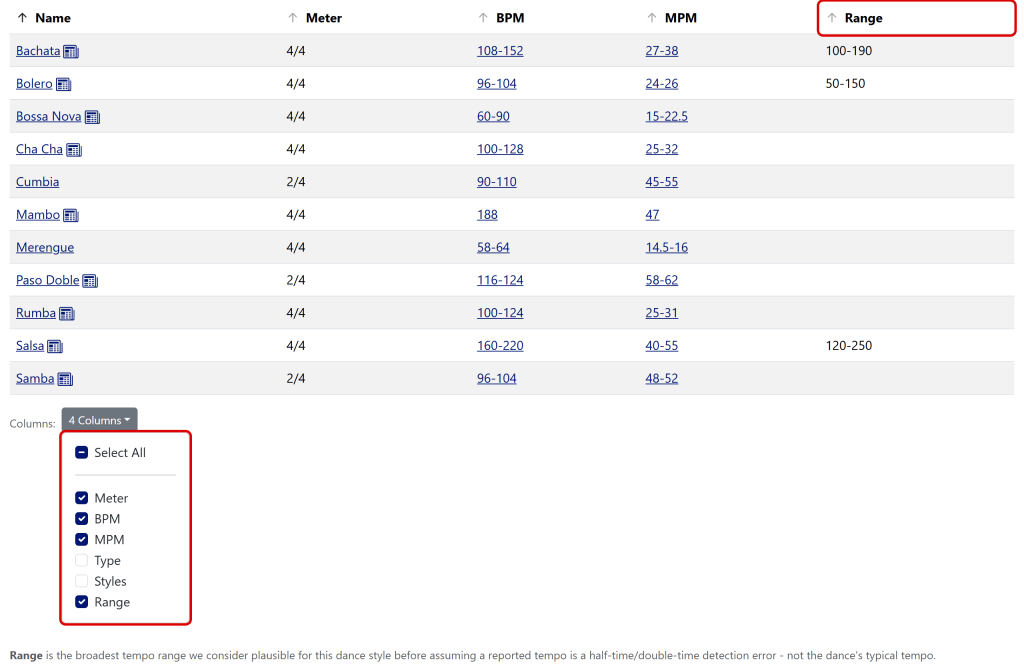
One column, Range, is hidden unless you turn it on. It shows the broadest tempo we consider plausible for a dance. It isn’t the dance’s typical tempo. We use it to catch songs whose tempo was reported at half or double the real speed, which is a common mistake in automatic tempo detection. Only some dances have a range so far. When the Range column is showing, a note below the table explains it.
Building a link by hand
You don’t need this section to use the page. The Copy Link button does all of it for you. But if you’re writing a web page or a handout and want to type a link straight into it, here are the parameters the page understands.
Start with the page address, https://www.music4dance.net/home/tempi, add a question mark, then any of these parameters, separated by ampersands (&). Every parameter is optional. Leaving one out gives you everything, which is the default. To choose more than one value, repeat the parameter, like styles=american-smooth&styles=american-rhythm.
The page skips any value it doesn’t recognize. That means a misspelled value selects nothing, so if a link opens an empty table (or a table with only the Name column), check the spelling against the table below.
| Parameter | Values | What it does |
|---|---|---|
| styles | american-rhythm, american-smooth, country, international-latin, international-standard, social | Same as the Style filter (A) |
| types | waltz, country, foxtrot, tango, latin, swing, other | Same as the Type filter (B) |
| meters | 2/4, 3/4, 4/4 | Same as the Meter filter (C) |
| organizations | acda, dancesport, ndca, ucwdc, worldcdf | Same as the Organization filter (D) |
| columns | meter, bpm, mpm, groupName (Type), styles, validationRange (Range) | Which columns to show. If you use this parameter at all, list every column you want, not just the one you’re adding. |
A few examples:
- All the dances in 3/4
- International Standard with NDCA tempos
- Just the Meter, BPM, and Range columns
- The Latin dances with the Range column showing, which is the view in the second image above
Related help
The Tempo Counter helps you work out the tempo of a song you’re listening to and shows which dances fit it. If something on this page doesn’t work the way you expect, or there’s a view you can’t link to, please send us feedback.


3 thoughts on “Dance Tempi”