
One of the core features of music4dance is the ability to filter the music catalog in different ways. This allows you to narrow down your search for music to dance to.
Clicking on any tag on the music4dance website will pop up a menu of options to help you refine your search.
Dance Style Tags
 Dance Style tags are found primarily in the “Dances” column of the song lists.

Clicking on a dance style tag will pop up a list of options:
- The name of the song
- A link to the dance style page
- A link to filter the current list to only songs tagged as this dance style (note that this option is only available if you’re already filtering the songs in some other way)
- A link to start a new list of all of the songs that can be danced in this style
- A link to this help page
- If there are tags specific to this dance style on this song those tags will be shown
- The dance vote control. This shows the number of votes that this dance has gotten on this song. If you’re logged in, you can add your vote (please do – this is what makes the whole site work!)
- If you don’t follow any of the links that will close this dialog, you can return to where you started by clicking the close button.
Song Tags
 Musical Genre,
  Tempo, and
  Other tags are found both in the song lists and the dance details pages.
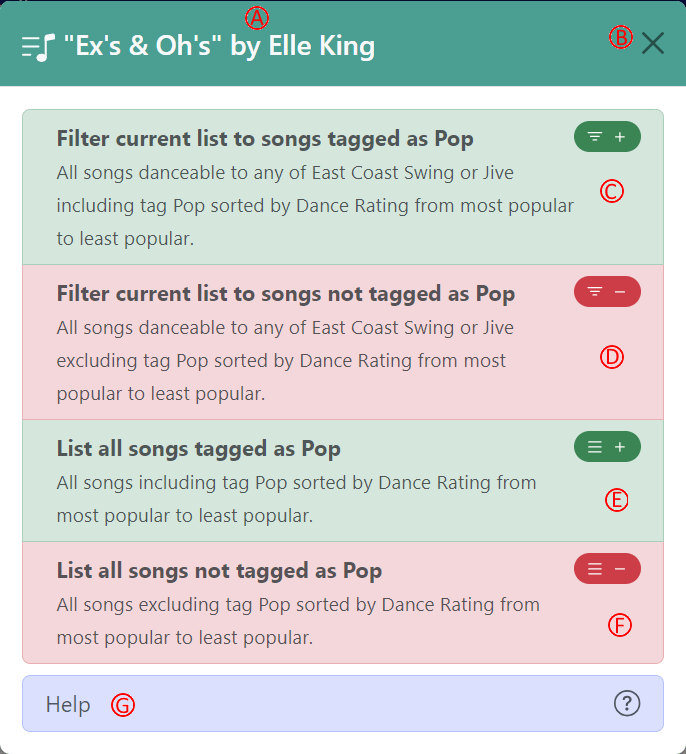
Clicking on a tag will pop up a list of filtering options. The most complete list of options (depending on context, these may not all be available) includes (the current filter in the example is all songs danceable to either East Coast swing or Jive and the user clicked on the “Pop” tag):
- The title of the current song
- Will close this list and take you back to the page you started at without modifying the filter.
- Take the current list and trim it down to only the songs that are tagged with the new tag.
- Take the current list and trim it down to only the songs that aren’t tagged with the new tag.
- Start a completely new list, including all of the songs with the new tag
- Start a completely new list, excluding all songs with the new tag
- Takes you to this help page.
Dance-Specific Tags
Tempo,  Style, and Other tags are found both in the dance style modal shown above or on the dance details pages,
When clicking on a tag in the context of a Dance Style Tag (available from the dance modal shown above or on the dance details pages, you’ll see a modal similar to the Song Tag modal, but with slightly different options. The intent behind this modal is to allow you to filter on tags that are specific to a dance – for instance, to find all American Foxtrot songs, but not to find songs that might be tagged as American Rumba and also Foxtrot.
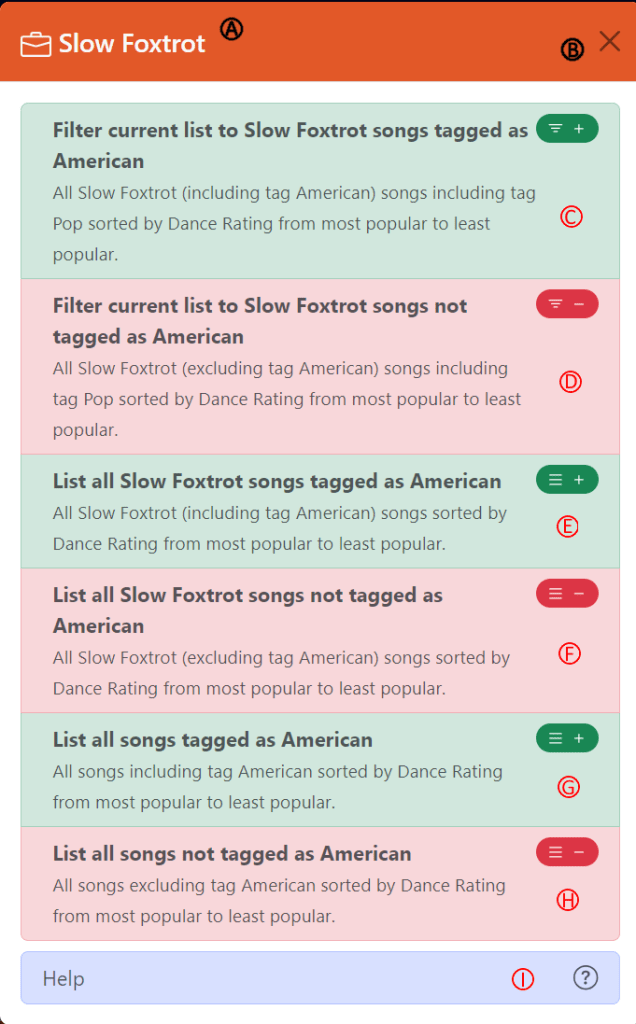
- The name of the Dance Style Tag we’re refining
- Will close this list and take you back to the page you started at without modifying the filter.
- Take the current list and trim it down to only the songs that are tagged with the new tag on the specific Dance Style.
- Take the current list and trim it down to only the songs that aren’t tagged with the new tag on the specific Dance Style.
- Start a completely new list, including all of the songs that are tagged with the new tag on the specific Dance Style.
- Start a completely new list, excluding all songs that aren’t tagged with the new tag on the specific Dance Style.
- List all songs tagged with the new tag (this searches all song and dance tags and ignores the Dance Style)
- List all songs not tagged with the new tag (this searches all song and dance tags and ignores the Dance Style)
- Takes you to this help page.
Adding Tags
Are you interested in adding your own tags? All you have to do is create an account and start tagging.
 music4dance
4 thoughts on “Tag Filtering”