
Every song in the music4dance library carries an artist credit exactly as its source song wrote it — Pitbull feat. Ne-Yo, Duke Ellington and His Orchestra, Dolly Parton & Kenny Rogers. That’s the right thing to display, but it’s an awkward thing to browse. If you wanted to know what else Kenny Rogers had recorded, his songs were scattered across every credit he happened to appear in.
So alongside the credit we now keep a list of the individual artists named in it. That gives you two things: a browsable index of every artist in the library, and an artist page that collects a performer’s solo recordings and their collaborations in one place.
Browsing the Artist Index
Choose Artists from the Music menu, or go straight to music4dance.net/song/artists. You’ll land on the hundred artists with the most songs in the library; from there you can search, or work through the alphabet.
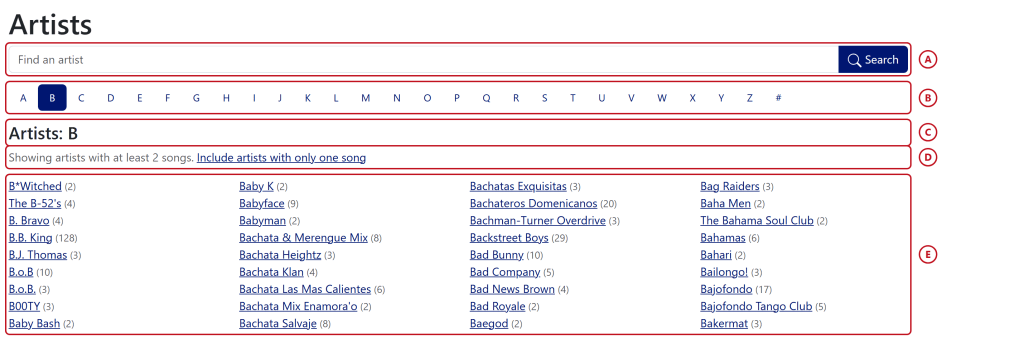
- Search box: type any part of an artist’s name. This is a straightforward name search, not the full song search — it looks only at artist names, and it matches anywhere in the name, so wonder finds both Stevie Wonder and Wonder Girls. Accents and capitalization don’t matter. Once you’ve typed two characters your browser will also offer a short list of matching artists, with the number of songs we have for each; picking one fills in the box, and then you press Search.
- Letters: jump to every artist whose name starts with a given letter. A leading “The” (or A, An, El, La, Los, Le, Die, Der…) is ignored, which is why The B-52’s and The Bahama Soul Club turn up under B above. The # at the end of the row collects names that don’t begin with a letter at all.
- Heading: tells you what you’re looking at — the most popular artists, a letter, or the results of a search.
- The one-song toggle: by default we hide artists we only have a single song for. That’s most of them: the library holds over 30,000 distinct artists, and the great majority appear exactly once. Click Include artists with only one song to see everything; the toggle sticks as you move between letters and searches.
- The artists: each name links to that artist’s page, with the number of songs we have in parentheses. Long lists run in columns and read down each column in turn.
An Artist’s Page
An artist page gathers every song we have for one performer — including the ones credited to a duet, a band they fronted, or a track they were a guest on. You can reach it from the artist index, from the artist column in any song list, or from the credit on a song details page.
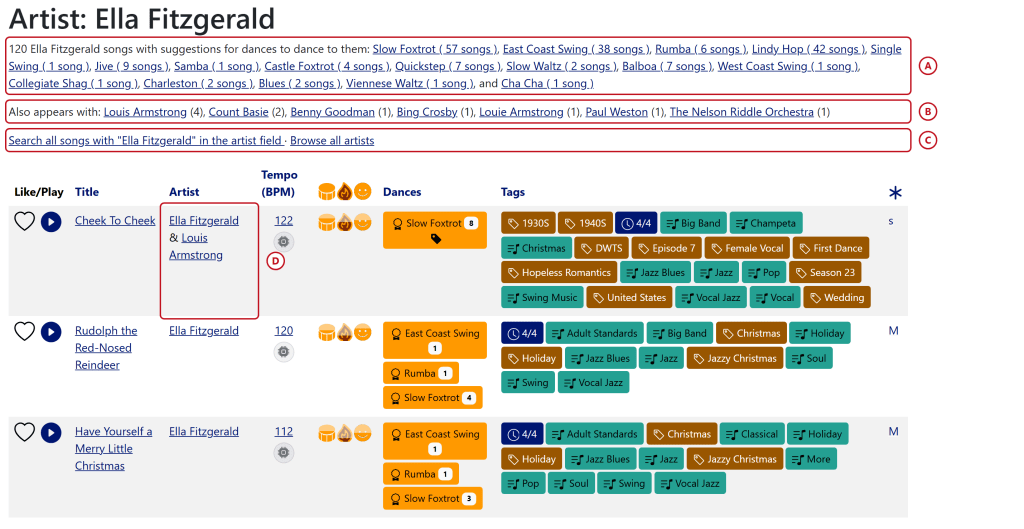
- Dances: how many of this artist’s songs the community has tagged for each dance style. The dance name goes to the dance information page; the count next to it searches for just those songs.
- Also appears with: the other artists who turn up on these songs, with the number of songs they share. This is the quickest way to wander sideways through the library — from Ella Fitzgerald to Count Basie to whoever he recorded with.
- Search links: the first runs a normal word search for the artist’s name across the whole library, which will turn up spelling variants and other creditings this page doesn’t catch. The second takes you back to the full artist index.
- The artist column: because this page collects collaborations, the songs don’t all share one credit — so we show each credit in full and link the individual names inside it. Cheek To Cheek is credited to both Ella Fitzgerald and Louis Armstrong, and either name will take you to that artist’s own page. A guest named only in the song title is added at the end as (with …). Everything else in the table works exactly as it does in the ordinary song list.
How We Work Out Who the Artists Are
Nobody hands us a tidy list of performers, so we read the credit string and the song title and make a judgement. Some markers are unambiguous and some really aren’t, and we’d rather leave a credit alone than invent an artist who doesn’t exist.
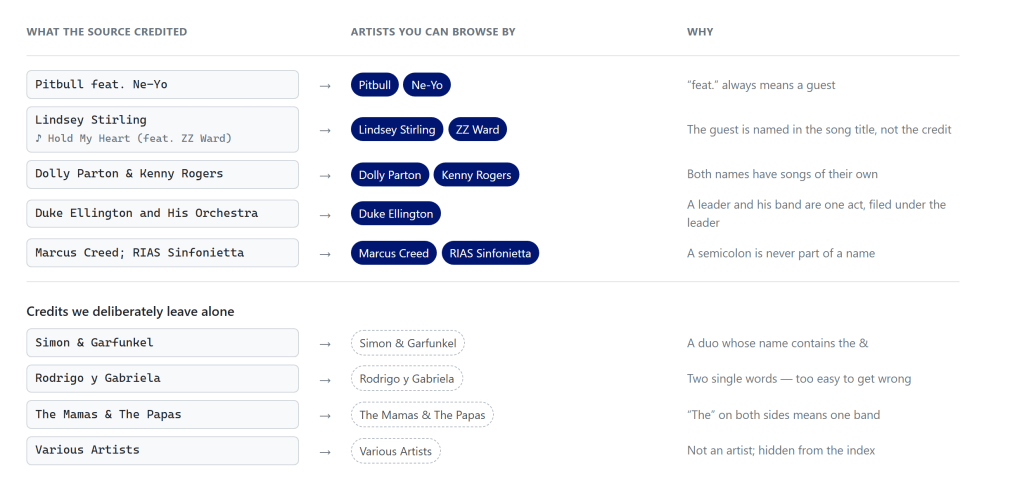
The credit itself is never rewritten. Whatever the source said is still what you see on the song page — the list of individual artists sits alongside it and is only used for linking and browsing.
A Note on Missing Collaborators:
We can only find an artist the credit or the title actually names. When we checked our credits against Spotify’s own artist lists, about a quarter of them turned out to involve more than one artist — but four times out of five, our copy of the credit contains no hint of it at all. Spotify knows the track is J Balvin and Chencho Corleone; our credit just says J Balvin, and no amount of cleverness will recover the difference. Closing that gap means getting better data from the services, not guessing harder, and it’s something we’re working on.
A Note on Spellings:
We ignore capitalization and accents when matching names, so Michael Bublé and Michael Buble land on the same page. We don’t attempt to reconcile genuinely different spellings, though, so P!nk and Pink are two different artists as far as the index is concerned. You can see this on Ella Fitzgerald’s page above: Louis Armstrong and Louie Armstrong both appear, because some of the credits we were given spell his name that way. If you spot a name that should obviously be merged with another, let us know.
Credits like Various Artists, Various and Unknown aren’t artists, so they’re left on the songs but kept out of the index.
A Note on Freshness:
The artist index is assembled from the whole library every few hours rather than rebuilt on every visit, so a brand-new song or a just-corrected name can take a little while to appear in the index and in the search suggestions. The artist pages themselves are always current.
Correcting an Artist List
If we’ve split a band name that shouldn’t have been split, or missed a guest who is right there in the credit, we’d like to know. Please feel free to file a bug or send feedback.
If you’d like to help with this sort of cleanup and don’t have editing privileges yet, get in touch with your music4dance username and we’ll set you up with the ability to do that.
Once we’ve updated your account, you can fix it yourself: Open the song details page and edit it in place — you’ll see these controls if you added the song yourself, or if your account has editing privileges.
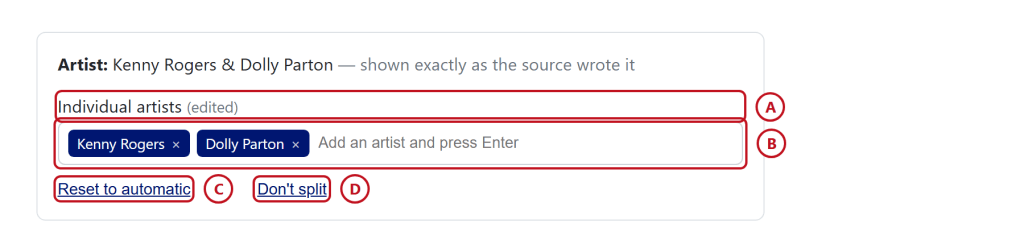
- Where the list came from: automatic means we worked it out ourselves, from a music service means the service told us, and edited means a person has corrected it. A list a person has edited is never overwritten by our automatic pass.
- The artists: add a name and press Enter, or click the × to remove one. Order matters a little — the first name is treated as the primary artist.
- Reset to automatic: throw away the corrections and let us work the list out again. Useful if you’ve made a mess of it, or if you fixed a misspelled credit and want the list recomputed from the corrected version.
- Don’t split: collapse the list back to the single credit. This is the one to reach for when we’ve broken a band name in half.
See Also
- Song Library — the song list that artist pages are built on
- Song Details — where credits and artist lists are edited
- Advanced Search — for searching artist names together with dances, tempo and tags

